<?xml version="1.0" encoding="utf-8"?><feed xmlns="http://www.w3.org/2005/Atom" ><generator uri="https://jekyllrb.com/" version="3.10.0">Jekyll</generator><link href="https://blog.superpat.com/feed.xml" rel="self" type="application/atom+xml" /><link href="https://blog.superpat.com/" rel="alternate" type="text/html" /><updated>2026-01-23T23:42:59+00:00</updated><id>https://blog.superpat.com/feed.xml</id><title type="html">Superpatterns</title><subtitle>Pat Patterson on the Cloud, Identity and Storage</subtitle><entry><title type="html">Salesforce Mutual Authentication – Part 3: Java HTTP Clients</title><link href="https://blog.superpat.com/salesforce-mutual-authentication-part-3-java-http-clients" rel="alternate" type="text/html" title="Salesforce Mutual Authentication – Part 3: Java HTTP Clients" /><published>2018-02-02T10:15:15+00:00</published><updated>2018-02-02T10:15:15+00:00</updated><id>https://blog.superpat.com/salesforce-mutual-authentication-part-3-java-http-clients</id><content type="html" xml:base="https://blog.superpat.com/salesforce-mutual-authentication-part-3-java-http-clients"><![CDATA[<p><img src="images/http-client-logos-150x92.png" alt="HTTP Client Logos" class="align-left" />In <a href="salesforce-mutual-authentication-part-1-the-basics">part 1</a> of this short series of blog entries on Salesforce’s <a href="https://help.salesforce.com/articleView?id=000240864&amp;type=1">Mutual Authentication</a> feature, I explained how to enable, configure and test Mutual Authentication. In <a href="salesforce-mutual-authentication-part-2-web-service-connector-wsc">part 2</a>, I documented the shortcomings of Salesforce’s <a href="https://github.com/forcedotcom/wsc">Web Service Connector</a> when trying to use Mutual Authentication, and showed how to work around them. This time, I’m going to show you how to use common Java HTTP Clients to call Salesforce APIs with Mutual Authentication. Recall from part 1 that enabling Mutual Authentiation on a Salesforce Profile means that users with that profile must call a separate API endpoint, connecting via TLS with a client key and certificate chain. A Java client application can load the client key and certificate as I explained in part 2:</p>

<div class="language-java highlighter-rouge"><div class="highlight"><pre class="highlight"><code><span class="c1">// Make a KeyStore from the PKCS-12 file</span>
<span class="nc">KeyStore</span> <span class="n">ks</span> <span class="o">=</span> <span class="nc">KeyStore</span><span class="o">.</span><span class="na">getInstance</span><span class="o">(</span><span class="s">"PKCS12"</span><span class="o">);</span>
<span class="k">try</span> <span class="o">(</span><span class="nc">FileInputStream</span> <span class="n">fis</span> <span class="o">=</span> <span class="k">new</span> <span class="nc">FileInputStream</span><span class="o">(</span><span class="no">KEYSTORE_PATH</span><span class="o">))</span> <span class="o">{</span>
  <span class="n">ks</span><span class="o">.</span><span class="na">load</span><span class="o">(</span><span class="n">fis</span><span class="o">,</span> <span class="no">KEYSTORE_PASSWORD</span><span class="o">.</span><span class="na">toCharArray</span><span class="o">());</span>
<span class="o">}</span>

<span class="c1">// Make a KeyManagerFactory from the KeyStore</span>
<span class="nc">KeyManagerFactory</span> <span class="n">kmf</span> <span class="o">=</span> <span class="nc">KeyManagerFactory</span><span class="o">.</span><span class="na">getInstance</span><span class="o">(</span><span class="s">"SunX509"</span><span class="o">);</span>
<span class="n">kmf</span><span class="o">.</span><span class="na">init</span><span class="o">(</span><span class="n">ks</span><span class="o">,</span> <span class="no">KEYSTORE_PASSWORD</span><span class="o">.</span><span class="na">toCharArray</span><span class="o">());</span>

<span class="c1">// Now make an SSL Context with our Key Manager and the default Trust Manager</span>
<span class="nc">SSLContext</span> <span class="n">sslContext</span> <span class="o">=</span> <span class="nc">SSLContext</span><span class="o">.</span><span class="na">getInstance</span><span class="o">(</span><span class="s">"TLS"</span><span class="o">);</span>
<span class="n">sslContext</span><span class="o">.</span><span class="na">init</span><span class="o">(</span><span class="n">kmf</span><span class="o">.</span><span class="na">getKeyManagers</span><span class="o">(),</span> <span class="kc">null</span><span class="o">,</span> <span class="kc">null</span><span class="o">);</span>
</code></pre></div></div>

<p>We’ll also need to obtain a session ID. I’ll just reuse the SOAP login code from last time, though you could also use <a href="https://help.salesforce.com/articleView?id=remoteaccess_authenticate_overview.htm">any of the OAuth mechanisms</a>.</p>

<div class="language-java highlighter-rouge"><div class="highlight"><pre class="highlight"><code><span class="c1">// Login as normal to get instance URL and session token</span>
<span class="nc">ConnectorConfig</span> <span class="n">config</span> <span class="o">=</span> <span class="k">new</span> <span class="nc">ConnectorConfig</span><span class="o">();</span>
<span class="n">config</span><span class="o">.</span><span class="na">setAuthEndpoint</span><span class="o">(</span><span class="s">"https://login.salesforce.com/services/Soap/u/39.0"</span><span class="o">);</span>
<span class="n">config</span><span class="o">.</span><span class="na">setUsername</span><span class="o">(</span><span class="no">USERNAME</span><span class="o">);</span>
<span class="n">config</span><span class="o">.</span><span class="na">setPassword</span><span class="o">(</span><span class="no">PASSWORD</span><span class="o">);</span>

<span class="c1">// Uncomment for more detail on what's going on!</span>
<span class="c1">//config.setTraceMessage(true);</span>

<span class="c1">// This will set the session info in config</span>
<span class="nc">Connector</span><span class="o">.</span><span class="na">newConnection</span><span class="o">(</span><span class="n">config</span><span class="o">);</span>

<span class="c1">// Display some current settings</span>
<span class="nc">System</span><span class="o">.</span><span class="na">out</span><span class="o">.</span><span class="na">println</span><span class="o">(</span><span class="s">"Auth EndPoint: "</span><span class="o">+</span><span class="n">config</span><span class="o">.</span><span class="na">getAuthEndpoint</span><span class="o">());</span>
<span class="nc">System</span><span class="o">.</span><span class="na">out</span><span class="o">.</span><span class="na">println</span><span class="o">(</span><span class="s">"Service EndPoint: "</span><span class="o">+</span><span class="n">config</span><span class="o">.</span><span class="na">getServiceEndpoint</span><span class="o">());</span>

<span class="nc">String</span> <span class="n">sessionId</span> <span class="o">=</span> <span class="n">config</span><span class="o">.</span><span class="na">getSessionId</span><span class="o">();</span>
<span class="nc">String</span> <span class="n">instance</span> <span class="o">=</span> <span class="k">new</span> <span class="no">URL</span><span class="o">(</span><span class="n">config</span><span class="o">.</span><span class="na">getServiceEndpoint</span><span class="o">()).</span><span class="na">getHost</span><span class="o">();</span>
</code></pre></div></div>

<p>Let’s look at how we proceed then, in a few common scenarios. All of the below code is available in <a href="https://github.com/metadaddy/mutual-auth">this Github project</a>.</p>

<h1 id="javas-httpurlconnection">Java’s HttpURLConnection</h1>

<p>This is pretty much the most basic way of accessing an HTTP endpoint in Java. We create a URL object and get the <code class="language-plaintext highlighter-rouge">HttpURLConnection</code> as usual, then we can set the <code class="language-plaintext highlighter-rouge">SSLSocketFactory</code> on the connection:</p>

<div class="language-java highlighter-rouge"><div class="highlight"><pre class="highlight"><code><span class="c1">// URL to get a list of REST services</span>
<span class="c1">// For example: https://na30.salesforce.com:8443/services/data/v41.0</span>
<span class="no">URL</span> <span class="n">url</span> <span class="o">=</span> <span class="k">new</span> <span class="no">URL</span><span class="o">(</span><span class="s">"https://"</span> <span class="o">+</span> <span class="n">instance</span> <span class="o">+</span> <span class="s">":"</span> <span class="o">+</span> <span class="no">MUTUAL_AUTHENTICATION_PORT</span>
    <span class="o">+</span> <span class="s">"/services/data/v"</span> <span class="o">+</span> <span class="no">API_VERSION</span><span class="o">);</span>

<span class="nc">HttpURLConnection</span> <span class="n">conn</span> <span class="o">=</span> <span class="o">(</span><span class="nc">HttpURLConnection</span><span class="o">)</span><span class="n">url</span><span class="o">.</span><span class="na">openConnection</span><span class="o">();</span>

<span class="c1">// Check that we did get an HttpsURLConnection before casting to it</span>
<span class="k">if</span> <span class="o">(</span><span class="n">conn</span> <span class="k">instanceof</span> <span class="nc">HttpsURLConnection</span><span class="o">)</span> <span class="o">{</span>
  <span class="o">((</span><span class="nc">HttpsURLConnection</span><span class="o">)</span><span class="n">conn</span><span class="o">).</span><span class="na">setSSLSocketFactory</span><span class="o">(</span><span class="n">sslContext</span><span class="o">.</span><span class="na">getSocketFactory</span><span class="o">());</span>
<span class="o">}</span>
</code></pre></div></div>

<p>Now we set the authorization header as we normally would. I’m also using the <code class="language-plaintext highlighter-rouge">X-PrettyPrint</code> header to make the REST API response a bit easier to read.</p>

<div class="language-java highlighter-rouge"><div class="highlight"><pre class="highlight"><code><span class="c1">// Set the Authorization header</span>
<span class="n">conn</span><span class="o">.</span><span class="na">setRequestProperty</span><span class="o">(</span><span class="s">"Authorization"</span><span class="o">,</span> <span class="s">"OAuth "</span><span class="o">+</span><span class="n">sessionId</span><span class="o">);</span>
<span class="c1">// Make the response pretty</span>
<span class="n">conn</span><span class="o">.</span><span class="na">setRequestProperty</span><span class="o">(</span><span class="s">"X-PrettyPrint"</span><span class="o">,</span> <span class="s">"1"</span><span class="o">);</span>
</code></pre></div></div>

<p>Finally, we’ll pull the data from the HttpURLConnection’s OutputStream and dump it to System.out:</p>

<div class="language-java highlighter-rouge"><div class="highlight"><pre class="highlight"><code><span class="c1">// Dump the response to System.out</span>
<span class="k">try</span> <span class="o">(</span><span class="nc">BufferedReader</span> <span class="n">br</span> <span class="o">=</span>
    <span class="k">new</span> <span class="nf">BufferedReader</span><span class="o">(</span>
      <span class="k">new</span> <span class="nf">InputStreamReader</span><span class="o">(</span><span class="n">conn</span><span class="o">.</span><span class="na">getInputStream</span><span class="o">())))</span> <span class="o">{</span>
  <span class="nc">String</span> <span class="n">input</span><span class="o">;</span>

  <span class="k">while</span> <span class="o">((</span><span class="n">input</span> <span class="o">=</span> <span class="n">br</span><span class="o">.</span><span class="na">readLine</span><span class="o">())</span> <span class="o">!=</span> <span class="kc">null</span><span class="o">){</span>
    <span class="nc">System</span><span class="o">.</span><span class="na">out</span><span class="o">.</span><span class="na">println</span><span class="o">(</span><span class="n">input</span><span class="o">);</span>
  <span class="o">}</span>
<span class="o">}</span>
</code></pre></div></div>

<p>The result is the expected list of Salesforce REST services:</p>

<div class="language-json highlighter-rouge"><div class="highlight"><pre class="highlight"><code><span class="p">{</span><span class="w">
  </span><span class="nl">"tooling"</span><span class="w"> </span><span class="p">:</span><span class="w"> </span><span class="s2">"/services/data/v41.0/tooling"</span><span class="p">,</span><span class="w">
  </span><span class="nl">"metadata"</span><span class="w"> </span><span class="p">:</span><span class="w"> </span><span class="s2">"/services/data/v41.0/metadata"</span><span class="p">,</span><span class="w">
  </span><span class="err">...lots</span><span class="w"> </span><span class="err">more...</span><span class="w">
  </span><span class="nl">"sobjects"</span><span class="w"> </span><span class="p">:</span><span class="w"> </span><span class="s2">"/services/data/v41.0/sobjects"</span><span class="p">,</span><span class="w">
  </span><span class="nl">"actions"</span><span class="w"> </span><span class="p">:</span><span class="w"> </span><span class="s2">"/services/data/v41.0/actions"</span><span class="p">,</span><span class="w">
  </span><span class="nl">"support"</span><span class="w"> </span><span class="p">:</span><span class="w"> </span><span class="s2">"/services/data/v41.0/support"</span><span class="w">
</span><span class="p">}</span><span class="w">
</span></code></pre></div></div>

<h1 id="apache-httpclient">Apache HttpClient</h1>

<p>How does the same example look with <a href="https://hc.apache.org/httpcomponents-client-ga/">Apache HttpClient</a>? We just need to set the <code class="language-plaintext highlighter-rouge">SSLContext</code> in the Apache <code class="language-plaintext highlighter-rouge">CloseableHttpClient</code>:</p>

<div class="language-java highlighter-rouge"><div class="highlight"><pre class="highlight"><code><span class="c1">// URL to get a list of REST services</span>
<span class="nc">String</span> <span class="n">url</span> <span class="o">=</span> <span class="s">"https://"</span> <span class="o">+</span> <span class="n">instance</span> <span class="o">+</span> <span class="s">":"</span> <span class="o">+</span> <span class="no">MUTUAL_AUTHENTICATION_PORT</span>
    <span class="o">+</span> <span class="s">"/services/data/v"</span> <span class="o">+</span> <span class="no">API_VERSION</span><span class="o">;</span>

<span class="c1">// Set the SSLContext in the HttpClient</span>
<span class="k">try</span> <span class="o">(</span><span class="nc">CloseableHttpClient</span> <span class="n">httpclient</span> <span class="o">=</span> <span class="nc">HttpClients</span><span class="o">.</span><span class="na">custom</span><span class="o">()</span>
    <span class="o">.</span><span class="na">setSSLContext</span><span class="o">(</span><span class="n">sslContext</span><span class="o">)</span>
    <span class="o">.</span><span class="na">build</span><span class="o">())</span> <span class="o">{</span>
  <span class="nc">HttpGet</span> <span class="n">httpGet</span> <span class="o">=</span> <span class="k">new</span> <span class="nc">HttpGet</span><span class="o">(</span><span class="n">url</span><span class="o">);</span>
  <span class="c1">// Set the Authorization header</span>
  <span class="n">httpGet</span><span class="o">.</span><span class="na">addHeader</span><span class="o">(</span><span class="s">"Authorization"</span><span class="o">,</span> <span class="s">"OAuth "</span><span class="o">+</span><span class="n">sessionId</span><span class="o">);</span>
  <span class="c1">// Make the response pretty</span>
  <span class="n">httpGet</span><span class="o">.</span><span class="na">addHeader</span><span class="o">(</span><span class="s">"X-PrettyPrint"</span><span class="o">,</span> <span class="s">"1"</span><span class="o">);</span>

  <span class="c1">// Execute the request</span>
  <span class="k">try</span> <span class="o">(</span><span class="nc">CloseableHttpResponse</span> <span class="n">response</span> <span class="o">=</span> <span class="n">httpclient</span><span class="o">.</span><span class="na">execute</span><span class="o">(</span><span class="n">httpGet</span><span class="o">);</span>
       <span class="nc">BufferedReader</span> <span class="n">br</span> <span class="o">=</span>
         <span class="k">new</span> <span class="nf">BufferedReader</span><span class="o">(</span>
           <span class="k">new</span> <span class="nf">InputStreamReader</span><span class="o">(</span><span class="n">response</span><span class="o">.</span><span class="na">getEntity</span><span class="o">().</span><span class="na">getContent</span><span class="o">()))</span>
  <span class="o">){</span>
    <span class="c1">// Dump the response to System.out</span>
    <span class="nc">String</span> <span class="n">input</span><span class="o">;</span>
    <span class="k">while</span> <span class="o">((</span><span class="n">input</span> <span class="o">=</span> <span class="n">br</span><span class="o">.</span><span class="na">readLine</span><span class="o">())</span> <span class="o">!=</span> <span class="kc">null</span><span class="o">){</span>
      <span class="nc">System</span><span class="o">.</span><span class="na">out</span><span class="o">.</span><span class="na">println</span><span class="o">(</span><span class="n">input</span><span class="o">);</span>
    <span class="o">}</span>
  <span class="o">}</span>
<span class="o">}</span>
</code></pre></div></div>

<p>The output is identical to the previous example.</p>

<h1 id="eclipse-jetty">Eclipse Jetty</h1>

<p><a href="https://www.eclipse.org/jetty/">Jetty</a> is a little more complex. We need to create a Jetty <code class="language-plaintext highlighter-rouge">SslContextFactory</code>, rather than a standard Java <code class="language-plaintext highlighter-rouge">KeyManagerFactory</code> and <code class="language-plaintext highlighter-rouge">SSLContext</code>. Note that we need to set the KeyStore password in the <code class="language-plaintext highlighter-rouge">SslContextFactory</code>:</p>

<div class="language-java highlighter-rouge"><div class="highlight"><pre class="highlight"><code><span class="nc">SslContextFactory</span> <span class="n">sslContextFactory</span> <span class="o">=</span> <span class="k">new</span> <span class="nc">SslContextFactory</span><span class="o">();</span>
<span class="n">sslContextFactory</span><span class="o">.</span><span class="na">setKeyStore</span><span class="o">(</span><span class="n">ks</span><span class="o">);</span>
<span class="c1">// Need to set password in the SSLContextFactory even though it's set in the KeyStore</span>
<span class="n">sslContextFactory</span><span class="o">.</span><span class="na">setKeyStorePassword</span><span class="o">(</span><span class="no">KEYSTORE_PASSWORD</span><span class="o">);</span>
</code></pre></div></div>

<p>Now we can create a Jetty <code class="language-plaintext highlighter-rouge">HttpClient</code> with the <code class="language-plaintext highlighter-rouge">SslContextFactory</code>, and start it:</p>

<div class="language-java highlighter-rouge"><div class="highlight"><pre class="highlight"><code><span class="nc">HttpClient</span> <span class="n">httpClient</span> <span class="o">=</span> <span class="k">new</span> <span class="nc">HttpClient</span><span class="o">(</span><span class="n">sslContextFactory</span><span class="o">);</span>
<span class="n">httpClient</span><span class="o">.</span><span class="na">start</span><span class="o">();</span>
</code></pre></div></div>

<p>Executing the request proceeds as usual, and results in identical output:</p>

<div class="language-java highlighter-rouge"><div class="highlight"><pre class="highlight"><code><span class="nc">String</span> <span class="n">response</span> <span class="o">=</span> <span class="n">httpClient</span><span class="o">.</span><span class="na">newRequest</span><span class="o">(</span><span class="n">url</span><span class="o">)</span>
    <span class="o">.</span><span class="na">header</span><span class="o">(</span><span class="s">"Authorization"</span><span class="o">,</span> <span class="s">"OAuth "</span> <span class="o">+</span> <span class="n">sessionId</span><span class="o">)</span>
    <span class="o">.</span><span class="na">header</span><span class="o">(</span><span class="s">"X-PrettyPrint"</span><span class="o">,</span> <span class="s">"1"</span><span class="o">)</span>
    <span class="o">.</span><span class="na">send</span><span class="o">()</span>
    <span class="o">.</span><span class="na">getContentAsString</span><span class="o">();</span>

<span class="nc">System</span><span class="o">.</span><span class="na">out</span><span class="o">.</span><span class="na">println</span><span class="o">(</span><span class="n">response</span><span class="o">);</span>
</code></pre></div></div>

<p>Don’t forget to stop the <code class="language-plaintext highlighter-rouge">HttpClient</code> when you’re done with it:</p>

<div class="language-java highlighter-rouge"><div class="highlight"><pre class="highlight"><code><span class="n">httpClient</span><span class="o">.</span><span class="na">stop</span><span class="o">();</span>
</code></pre></div></div>

<h1 id="conclusion">Conclusion</h1>

<p>Salesforce Mutual Authentication offers an additional layer of security over default server-authenticated TLS - clients must possess the key corresponding to a certificate configured in the Salesforce org. As I showed in <a href="salesforce-mutual-authentication-part-1-the-basics">part 1 of this series of blog entries</a>, configuring Mutual Authentication in Salesforce is straightforward, as is testing the connection with curl, although the Salesforce documentation is not totally accurate. Salesforce’s <a href="https://github.com/forcedotcom/wsc">Web Service Connector</a> requires some modifications to make it compatible with Mutual Authentication, although, as I explained in <a href="salesforce-mutual-authentication-part-2-web-service-connector-wsc">part 2</a>, it is possible to engineer around the issues. The popular Java HTTP clients all provide mechanisms for setting the client key and certificate, and using them to call the Salesforce REST APIs is straightforward. Source code showing how to use Mutual Authentication via all of the above mechanisms is available in <a href="https://github.com/metadaddy/mutual-auth">my mutual-auth GitHub repo</a>. I hope you’ve enjoyed this exploration of Mutual Authentication, and that you’ve saved yourself a bit of time by reading it!</p>]]></content><author><name>user</name></author><category term="Uncategorized" /><summary type="html"><![CDATA[In part 1 of this short series of blog entries on Salesforce’s Mutual Authentication feature, I explained how to enable, configure and test Mutual Authentication. In part 2, I documented the shortcomings of Salesforce’s Web Service Connector when trying to use Mutual Authentication, and showed how to work around them. This time, I’m going to show you how to use common Java HTTP Clients to call Salesforce APIs with Mutual Authentication. Recall from part 1 that enabling Mutual Authentiation on a Salesforce Profile means that users with that profile must call a separate API endpoint, connecting via TLS with a client key and certificate chain. A Java client application can load the client key and certificate as I explained in part 2:]]></summary></entry><entry><title type="html">Salesforce Mutual Authentication - Part 2: Web Service Connector (WSC)</title><link href="https://blog.superpat.com/salesforce-mutual-authentication-part-2-web-service-connector-wsc" rel="alternate" type="text/html" title="Salesforce Mutual Authentication - Part 2: Web Service Connector (WSC)" /><published>2018-01-29T19:19:46+00:00</published><updated>2018-01-29T19:19:46+00:00</updated><id>https://blog.superpat.com/salesforce-mutual-authentication-part-2-web-service-connector-wsc</id><content type="html" xml:base="https://blog.superpat.com/salesforce-mutual-authentication-part-2-web-service-connector-wsc"><![CDATA[<p><img src="images/Code3-150x94.png" alt="Code" class="align-left" />In <a href="salesforce-mutual-authentication-part-1-the-basics">my last blog entry</a> I explained how to enable, configure and test Salesforce’s <a href="https://help.salesforce.com/articleView?id=000240864&amp;type=1">Mutual Authentication</a> feature. This time, I’ll share my experience getting Mutual Authentication working with the Java client SDK for Salesforce’s SOAP and Bulk APIs: <a href="https://github.com/forcedotcom/wsc">Web Service Connector</a>, aka WSC. <a href="https://streamsets.com/products/sdc">StreamSets Data Collector</a>’s Salesforce integration accesses the SOAP and Bulk APIs via WSC, so, when I was implementing Mutual Authentication in SDC, I examined WSC to see where I could configure the client key and certificate chain. Although there is no mention of <a href="https://docs.oracle.com/javase/8/docs/api/javax/net/ssl/SSLContext.html"><code class="language-plaintext highlighter-rouge">SSLContext</code></a> or <a href="https://docs.oracle.com/javase/8/docs/api/javax/net/ssl/SSLSocketFactory.html"><code class="language-plaintext highlighter-rouge">SSLSocketFactory</code></a> in the WSC code, it is possible to set a custom <a href="https://github.com/forcedotcom/wsc/blob/af53b297cfd1da3fdaea125fa172984f04b0cded/src/main/java/com/sforce/ws/transport/TransportFactory.java"><code class="language-plaintext highlighter-rouge">TransportFactory</code></a> on the WSC <a href="https://github.com/forcedotcom/wsc/blob/af53b297cfd1da3fdaea125fa172984f04b0cded/src/main/java/com/sforce/ws/ConnectorConfig.java"><code class="language-plaintext highlighter-rouge">ConnectorConfig</code></a> object. The <code class="language-plaintext highlighter-rouge">TransportFactory</code> is used to create a <a href="https://github.com/forcedotcom/wsc/blob/af53b297cfd1da3fdaea125fa172984f04b0cded/src/main/java/com/sforce/ws/transport/Transport.java"><code class="language-plaintext highlighter-rouge">Transport</code></a>, which in turn is responsible for making the HTTPS connection to Salesforce. To enable Mutual Authentication I would need to create an <code class="language-plaintext highlighter-rouge">SSLContext</code> with the client key and certificate chain. This is straightforward enough:</p>
<div class="language-java highlighter-rouge"><div class="highlight"><pre class="highlight"><code><span class="c1">// Make a KeyStore from the PKCS-12 file</span>
<span class="nc">KeyStore</span> <span class="n">ks</span> <span class="o">=</span> <span class="nc">KeyStore</span><span class="o">.</span><span class="na">getInstance</span><span class="o">(</span><span class="s">"PKCS12"</span><span class="o">);</span>
<span class="k">try</span> <span class="o">(</span><span class="nc">FileInputStream</span> <span class="n">fis</span> <span class="o">=</span> <span class="k">new</span> <span class="nc">FileInputStream</span><span class="o">(</span><span class="no">KEYSTORE_PATH</span><span class="o">))</span> <span class="o">{</span>
  <span class="n">ks</span><span class="o">.</span><span class="na">load</span><span class="o">(</span><span class="n">fis</span><span class="o">,</span> <span class="no">KEYSTORE_PASSWORD</span><span class="o">.</span><span class="na">toCharArray</span><span class="o">());</span>
<span class="o">}</span>

<span class="c1">// Make a KeyManagerFactory from the KeyStore</span>
<span class="nc">KeyManagerFactory</span> <span class="n">kmf</span> <span class="o">=</span> <span class="nc">KeyManagerFactory</span><span class="o">.</span><span class="na">getInstance</span><span class="o">(</span><span class="s">"SunX509"</span><span class="o">);</span>
<span class="n">kmf</span><span class="o">.</span><span class="na">init</span><span class="o">(</span><span class="n">ks</span><span class="o">,</span> <span class="no">KEYSTORE_PASSWORD</span><span class="o">.</span><span class="na">toCharArray</span><span class="o">());</span>

<span class="c1">// Now make an SSL Context with our Key Manager and the default Trust Manager</span>
<span class="nc">SSLContext</span> <span class="n">sslContext</span> <span class="o">=</span> <span class="nc">SSLContext</span><span class="o">.</span><span class="na">getInstance</span><span class="o">(</span><span class="s">"TLS"</span><span class="o">);</span>
<span class="n">sslContext</span><span class="o">.</span><span class="na">init</span><span class="o">(</span><span class="n">kmf</span><span class="o">.</span><span class="na">getKeyManagers</span><span class="o">(),</span> <span class="kc">null</span><span class="o">,</span> <span class="kc">null</span><span class="o">);</span>
</code></pre></div></div>

<p>Given the <code class="language-plaintext highlighter-rouge">SSLContext</code>, we can create an <code class="language-plaintext highlighter-rouge">SSLSocketFactory</code> and set it on the <code class="language-plaintext highlighter-rouge">HttpsURLConnection</code>. Here’s the code we’d use if we were simply using the <code class="language-plaintext highlighter-rouge">java.net</code> classes directly:</p>

<div class="language-java highlighter-rouge"><div class="highlight"><pre class="highlight"><code><span class="no">URL</span> <span class="n">url</span> <span class="o">=</span> <span class="k">new</span> <span class="no">URL</span><span class="o">(</span><span class="n">someURL</span><span class="o">);</span>
<span class="nc">HttpURLConnection</span> <span class="n">conn</span> <span class="o">=</span> <span class="o">(</span><span class="nc">HttpURLConnection</span><span class="o">)</span><span class="n">url</span><span class="o">.</span><span class="na">openConnection</span><span class="o">();</span>
<span class="c1">// Check that we did get an HttpsURLConnection before casting to it</span>
<span class="k">if</span> <span class="o">(</span><span class="n">conn</span> <span class="k">instanceof</span> <span class="nc">HttpsURLConnection</span><span class="o">)</span> <span class="o">{</span>
  <span class="o">((</span><span class="nc">HttpsURLConnection</span><span class="o">)</span><span class="n">conn</span><span class="o">).</span><span class="na">setSSLSocketFactory</span><span class="o">(</span>
      <span class="n">sslContext</span><span class="o">.</span><span class="na">getSocketFactory</span><span class="o">()</span>
  <span class="o">);</span>
<span class="o">}</span>
</code></pre></div></div>

<h1 id="mutual-authentication-and-the-salesforce-soap-api">Mutual Authentication and the Salesforce SOAP API</h1>

<p>The default <code class="language-plaintext highlighter-rouge">Transport</code> implementation, <a href="https://github.com/forcedotcom/wsc/blob/af53b297cfd1da3fdaea125fa172984f04b0cded/src/main/java/com/sforce/ws/transport/JdkHttpTransport.java"><code class="language-plaintext highlighter-rouge">JdkHttpTransport</code></a>, looked like a good place to start. My first thought was to extend <code class="language-plaintext highlighter-rouge">JdkHttpTransport</code>, overriding the relevant methods. Unfortunately, <code class="language-plaintext highlighter-rouge">JdkHttpTransport</code>’s <code class="language-plaintext highlighter-rouge">createConnection</code> method, which calls <code class="language-plaintext highlighter-rouge">url.openConnection()</code>, is <code class="language-plaintext highlighter-rouge">static</code>, so it’s impossible to override. The <code class="language-plaintext highlighter-rouge">connectRaw()</code> method also looked like a promising route, since it calls <code class="language-plaintext highlighter-rouge">createConnection()</code>, performs some setup on the <code class="language-plaintext highlighter-rouge">HttpURLConnection</code>, and then gets the <code class="language-plaintext highlighter-rouge">OutputStream</code>, but it’s <code class="language-plaintext highlighter-rouge">private</code>, and once the <code class="language-plaintext highlighter-rouge">OutputStream</code> has been created, it’s too late to set the <code class="language-plaintext highlighter-rouge">SSLSocketFactory</code>. In my searching for an answer, I came across this comment from Salesforce Software Engineer <a href="https://www.linkedin.com/in/meowmeow/">Steven Lawrance</a> in a <a href="https://success.salesforce.com/answers?id=9063A000000Dj7SQAS">Salesforce Trailblazer Community answer</a>.</p>

<blockquote>
  <p>You’ll generally need to set the TransportFactory in the ConnectorConfig object that you use to create the PartnerConnection (or EnterpriseConnection, etc), though another option is to set the Transport. It’s possible to create a Transport implementation that is based off of the com.sforce.ws.transport.JdkHttpTransport class while having the JdkHttpTransport create the connection with its static createConnection method. Your Transport implementation can then set up the SSLSocketFactory (casting the connection to HttpsURLConnection is required to do that), and your SSLSocketFactory can be created from creating an SSLContext that is initialized to include your client certificate.</p>
</blockquote>

<p>I followed Steven’s advice and created <a href="https://github.com/streamsets/datacollector/blob/4a46b7414ae8407850f360e8f09281950b430a2a/salesforce-lib/src/main/java/com/streamsets/pipeline/lib/salesforce/mutualauth/ClientSSLTransport.java"><code class="language-plaintext highlighter-rouge">ClientSSLTransport</code></a>, a clone of <code class="language-plaintext highlighter-rouge">JdkHttpTransport</code>, and <a href="https://github.com/streamsets/datacollector/blob/4a46b7414ae8407850f360e8f09281950b430a2a/salesforce-lib/src/main/java/com/streamsets/pipeline/lib/salesforce/mutualauth/ClientSSLTransportFactory.java"><code class="language-plaintext highlighter-rouge">ClientSSLTransportFactory</code></a>, its factory class. To minimize the amount of copied code, I changed the implementation of <code class="language-plaintext highlighter-rouge">connectRaw()</code> to call <code class="language-plaintext highlighter-rouge">JdkHttpTransport.createConnection()</code> and then set the <code class="language-plaintext highlighter-rouge">SSLSocketFactory</code>:</p>

<div class="language-java highlighter-rouge"><div class="highlight"><pre class="highlight"><code><span class="kd">private</span> <span class="nc">OutputStream</span> <span class="nf">connectRaw</span><span class="o">(</span><span class="nc">String</span> <span class="n">uri</span><span class="o">,</span> <span class="nc">HashMap</span><span class="o">&lt;</span><span class="nc">String</span><span class="o">,</span> <span class="nc">String</span><span class="o">&gt;</span> <span class="n">httpHeaders</span><span class="o">,</span> <span class="kt">boolean</span> <span class="n">enableCompression</span><span class="o">)</span>
<span class="kd">throws</span> <span class="nc">IOException</span> <span class="o">{</span>
  <span class="n">url</span> <span class="o">=</span> <span class="k">new</span> <span class="no">URL</span><span class="o">(</span><span class="n">uri</span><span class="o">);</span>

  <span class="n">connection</span> <span class="o">=</span> <span class="nc">JdkHttpTransport</span><span class="o">.</span><span class="na">createConnection</span><span class="o">(</span><span class="n">config</span><span class="o">,</span> <span class="n">url</span><span class="o">,</span> 
      <span class="n">httpHeaders</span><span class="o">,</span> <span class="n">enableCompression</span><span class="o">);</span>
  <span class="k">if</span> <span class="o">(</span><span class="n">connection</span> <span class="k">instanceof</span> <span class="nc">HttpsURLConnection</span><span class="o">)</span> <span class="o">{</span>
    <span class="o">((</span><span class="nc">HttpsURLConnection</span><span class="o">)</span><span class="n">connection</span><span class="o">).</span><span class="na">setSSLSocketFactory</span><span class="o">(</span>
        <span class="n">sslContext</span><span class="o">.</span><span class="na">getSocketFactory</span><span class="o">()</span>
    <span class="o">);</span>
  <span class="o">}</span>
  <span class="n">connection</span><span class="o">.</span><span class="na">setRequestMethod</span><span class="o">(</span><span class="s">"POST"</span><span class="o">);</span>
  <span class="n">connection</span><span class="o">.</span><span class="na">setDoInput</span><span class="o">(</span><span class="kc">true</span><span class="o">);</span>
  <span class="n">connection</span><span class="o">.</span><span class="na">setDoOutput</span><span class="o">(</span><span class="kc">true</span><span class="o">);</span>
  <span class="k">if</span> <span class="o">(</span><span class="n">config</span><span class="o">.</span><span class="na">useChunkedPost</span><span class="o">())</span> <span class="o">{</span>
    <span class="n">connection</span><span class="o">.</span><span class="na">setChunkedStreamingMode</span><span class="o">(</span><span class="mi">4096</span><span class="o">);</span>
  <span class="o">}</span>

  <span class="k">return</span> <span class="n">connection</span><span class="o">.</span><span class="na">getOutputStream</span><span class="o">();</span>
<span class="o">}</span>
</code></pre></div></div>

<p>With this in place, I wrote a <a href="https://github.com/metadaddy/mutual-auth/blob/master/src/main/java/mutualauth/TestWSC.java">simple test application</a> to call an API with Mutual Authentication. As I mentioned in the previous blog post, the Salesforce login service does not support Mutual Authentication, so the inital code to authenticate is just the same as the default case:</p>

<div class="language-java highlighter-rouge"><div class="highlight"><pre class="highlight"><code><span class="c1">// Login as normal to get instance URL and session token</span>
<span class="nc">ConnectorConfig</span> <span class="n">config</span> <span class="o">=</span> <span class="k">new</span> <span class="nc">ConnectorConfig</span><span class="o">();</span>
<span class="n">config</span><span class="o">.</span><span class="na">setAuthEndpoint</span><span class="o">(</span><span class="s">"https://login.salesforce.com/services/Soap/u/39.0"</span><span class="o">);</span>
<span class="n">config</span><span class="o">.</span><span class="na">setSslContext</span><span class="o">(</span><span class="n">sc</span><span class="o">);</span>
<span class="n">config</span><span class="o">.</span><span class="na">setUsername</span><span class="o">(</span><span class="no">USERNAME</span><span class="o">);</span>
<span class="n">config</span><span class="o">.</span><span class="na">setPassword</span><span class="o">(</span><span class="no">PASSWORD</span><span class="o">);</span>

<span class="n">connection</span> <span class="o">=</span> <span class="nc">Connector</span><span class="o">.</span><span class="na">newConnection</span><span class="o">(</span><span class="n">config</span><span class="o">);</span>

<span class="c1">// display some current settings</span>
<span class="nc">System</span><span class="o">.</span><span class="na">out</span><span class="o">.</span><span class="na">println</span><span class="o">(</span><span class="s">"Auth EndPoint: "</span><span class="o">+</span><span class="n">config</span><span class="o">.</span><span class="na">getAuthEndpoint</span><span class="o">());</span>
<span class="nc">System</span><span class="o">.</span><span class="na">out</span><span class="o">.</span><span class="na">println</span><span class="o">(</span><span class="s">"Service EndPoint: "</span><span class="o">+</span><span class="n">config</span><span class="o">.</span><span class="na">getServiceEndpoint</span><span class="o">());</span>
</code></pre></div></div>

<p>Running this bit of code revealed that, not only does the login service not support Mutual Authentication, it returns the default service endpoint:</p>

<div class="language-java highlighter-rouge"><div class="highlight"><pre class="highlight"><code><span class="nc">Auth</span> <span class="nl">EndPoint:</span> <span class="nl">https:</span><span class="c1">//login.salesforce.com/services/Soap/u/39.0</span>
<span class="nc">Service</span> <span class="nl">EndPoint:</span> <span class="nl">https:</span><span class="c1">//na30.salesforce.com/services/Soap/u/39.0/00D36000000psQd</span>
</code></pre></div></div>

<p>Before we can call an API, then, we have to override the service endpoint, changing the port from the default 443 to 8443, as well as setting the <code class="language-plaintext highlighter-rouge">TransportFactory</code>:</p>

<div class="language-java highlighter-rouge"><div class="highlight"><pre class="highlight"><code><span class="nc">String</span> <span class="n">serviceEndpoint</span> <span class="o">=</span> <span class="n">config</span><span class="o">.</span><span class="na">getServiceEndpoint</span><span class="o">();</span>
<span class="c1">// Override service endpoint port to 8443</span>
<span class="n">config</span><span class="o">.</span><span class="na">setServiceEndpoint</span><span class="o">(</span><span class="n">changePort</span><span class="o">(</span><span class="n">serviceEndpoint</span><span class="o">,</span> <span class="mi">8443</span><span class="o">));</span>

<span class="c1">// Set custom transport factory</span>
<span class="n">config</span><span class="o">.</span><span class="na">setTransportFactory</span><span class="o">(</span><span class="k">new</span> <span class="nc">ClientSSLTransportFactory</span><span class="o">(</span><span class="n">sslContext</span><span class="o">));</span>

<span class="o">...</span>

<span class="kd">private</span> <span class="kd">static</span> <span class="nc">String</span> <span class="nf">changePort</span><span class="o">(</span><span class="nc">String</span> <span class="n">url</span><span class="o">,</span> <span class="kt">int</span> <span class="n">port</span><span class="o">)</span> <span class="kd">throws</span> <span class="nc">URISyntaxException</span> <span class="o">{</span>
  <span class="no">URI</span> <span class="n">uri</span> <span class="o">=</span> <span class="k">new</span> <span class="no">URI</span><span class="o">(</span><span class="n">url</span><span class="o">);</span>
  <span class="k">return</span> <span class="k">new</span> <span class="nf">URI</span><span class="o">(</span>
      <span class="n">uri</span><span class="o">.</span><span class="na">getScheme</span><span class="o">(),</span> <span class="n">uri</span><span class="o">.</span><span class="na">getUserInfo</span><span class="o">(),</span> <span class="n">uri</span><span class="o">.</span><span class="na">getHost</span><span class="o">(),</span>
      <span class="n">port</span><span class="o">,</span> <span class="n">uri</span><span class="o">.</span><span class="na">getPath</span><span class="o">(),</span> <span class="n">uri</span><span class="o">.</span><span class="na">getQuery</span><span class="o">(),</span> <span class="n">uri</span><span class="o">.</span><span class="na">getFragment</span><span class="o">()).</span><span class="na">toString</span><span class="o">();</span>
<span class="o">}</span>
</code></pre></div></div>

<p>With this in place, I could call a SOAP API in the normal way:</p>

<div class="language-java highlighter-rouge"><div class="highlight"><pre class="highlight"><code><span class="nc">System</span><span class="o">.</span><span class="na">out</span><span class="o">.</span><span class="na">println</span><span class="o">(</span><span class="s">"Querying for the 5 newest Contacts..."</span><span class="o">);</span>

<span class="c1">// query for the 5 newest contacts</span>
<span class="nc">QueryResult</span> <span class="n">queryResults</span> <span class="o">=</span> <span class="n">connection</span><span class="o">.</span><span class="na">query</span><span class="o">(</span><span class="s">"SELECT Id, FirstName, LastName, Account.Name "</span> <span class="o">+</span>
    <span class="s">"FROM Contact WHERE AccountId != NULL ORDER BY CreatedDate DESC LIMIT 5"</span><span class="o">);</span>
<span class="k">if</span> <span class="o">(</span><span class="n">queryResults</span><span class="o">.</span><span class="na">getSize</span><span class="o">()</span> <span class="o">&gt;</span> <span class="mi">0</span><span class="o">)</span> <span class="o">{</span>
  <span class="k">for</span> <span class="o">(</span><span class="nc">SObject</span> <span class="nl">s:</span> <span class="n">queryResults</span><span class="o">.</span><span class="na">getRecords</span><span class="o">())</span> <span class="o">{</span>
    <span class="nc">System</span><span class="o">.</span><span class="na">out</span><span class="o">.</span><span class="na">println</span><span class="o">(</span><span class="s">"Id: "</span> <span class="o">+</span> <span class="n">s</span><span class="o">.</span><span class="na">getId</span><span class="o">()</span> <span class="o">+</span> <span class="s">" "</span> <span class="o">+</span> <span class="n">s</span><span class="o">.</span><span class="na">getField</span><span class="o">(</span><span class="s">"FirstName"</span><span class="o">)</span> <span class="o">+</span> <span class="s">" "</span> <span class="o">+</span>
        <span class="n">s</span><span class="o">.</span><span class="na">getField</span><span class="o">(</span><span class="s">"LastName"</span><span class="o">)</span> <span class="o">+</span> <span class="s">" - "</span> <span class="o">+</span> <span class="n">s</span><span class="o">.</span><span class="na">getChild</span><span class="o">(</span><span class="s">"Account"</span><span class="o">).</span><span class="na">getField</span><span class="o">(</span><span class="s">"Name"</span><span class="o">));</span>
  <span class="o">}</span>
<span class="o">}</span>
</code></pre></div></div>

<p>With output:</p>

<div class="language-plaintext highlighter-rouge"><div class="highlight"><pre class="highlight"><code>Querying for the 5 newest Contacts...
Id: 00336000009BusFAAS Rose Gonzalez - Edge Communications
Id: 00336000009BusGAAS Sean Forbes - Edge Communications
Id: 00336000009BusHAAS Jack Rogers - Burlington Textiles Corp of America
Id: 00336000009BusIAAS Pat Stumuller - Pyramid Construction Inc.
Id: 00336000009BusJAAS Andy Young - Dickenson plc
</code></pre></div></div>

<p>Success!</p>

<h1 id="mutual-authentication-and-the-salesforce-bulk-api">Mutual Authentication and the Salesforce Bulk API</h1>

<p>Now, what about the Bulk API? Running a test app resulted in an error when I tried to create a Bulk API Job. Tracing through the WSC code revealed that when <code class="language-plaintext highlighter-rouge">ConnectorConfig.createTransport()</code> creates a <code class="language-plaintext highlighter-rouge">Transport</code> with a custom <code class="language-plaintext highlighter-rouge">TransportFactory</code>, it does not set the <code class="language-plaintext highlighter-rouge">ConnectorConfig</code> on the <code class="language-plaintext highlighter-rouge">Transport</code>:</p>

<div class="language-java highlighter-rouge"><div class="highlight"><pre class="highlight"><code><span class="kd">public</span> <span class="nc">Transport</span> <span class="nf">createTransport</span><span class="o">()</span> <span class="kd">throws</span> <span class="nc">ConnectionException</span> <span class="o">{</span>
  <span class="k">if</span><span class="o">(</span><span class="n">transportFactory</span> <span class="o">!=</span> <span class="kc">null</span><span class="o">)</span> <span class="o">{</span>
    <span class="k">return</span> <span class="n">transportFactory</span><span class="o">.</span><span class="na">createTransport</span><span class="o">();</span>
  <span class="o">}</span>

  <span class="k">try</span> <span class="o">{</span>
    <span class="nc">Transport</span> <span class="n">t</span> <span class="o">=</span> <span class="o">(</span><span class="nc">Transport</span><span class="o">)</span><span class="n">getTransport</span><span class="o">().</span><span class="na">newInstance</span><span class="o">();</span>
    <span class="n">t</span><span class="o">.</span><span class="na">setConfig</span><span class="o">(</span><span class="k">this</span><span class="o">);</span>
    <span class="k">return</span> <span class="n">t</span><span class="o">;</span>
  <span class="o">}</span> <span class="k">catch</span> <span class="o">(</span><span class="nc">InstantiationException</span> <span class="n">e</span><span class="o">)</span> <span class="o">{</span>
    <span class="k">throw</span> <span class="k">new</span> <span class="nf">ConnectionException</span><span class="o">(</span><span class="s">"Failed to create new Transport "</span> <span class="o">+</span> <span class="n">getTransport</span><span class="o">());</span>
  <span class="o">}</span> <span class="k">catch</span> <span class="o">(</span><span class="nc">IllegalAccessException</span> <span class="n">e</span><span class="o">)</span> <span class="o">{</span>
    <span class="k">throw</span> <span class="k">new</span> <span class="nf">ConnectionException</span><span class="o">(</span><span class="s">"Failed to create new Transport "</span> <span class="o">+</span> <span class="n">getTransport</span><span class="o">());</span>
  <span class="o">}</span>
<span class="o">}</span>
</code></pre></div></div>

<p><code class="language-plaintext highlighter-rouge">ConnectorConfig.createTransport()</code> is only used when the WSC Bulk API client is POSTing to the Bulk API, since the POST method is hardcoded into <code class="language-plaintext highlighter-rouge">JdkHttpTransport.connectRaw()</code> (all SOAP requests use HTTP POST). When the client wants to do a GET, it uses <code class="language-plaintext highlighter-rouge">BulkConnection.doHttpGet()</code>, which does not use <code class="language-plaintext highlighter-rouge">ConnectorConfig.createTransport()</code>, instead calling <code class="language-plaintext highlighter-rouge">config.createConnection()</code>:</p>

<div class="language-java highlighter-rouge"><div class="highlight"><pre class="highlight"><code><span class="kd">private</span> <span class="nc">InputStream</span> <span class="nf">doHttpGet</span><span class="o">(</span><span class="no">URL</span> <span class="n">url</span><span class="o">)</span> <span class="kd">throws</span> <span class="nc">IOException</span><span class="o">,</span> <span class="nc">AsyncApiException</span> <span class="o">{</span>
  <span class="nc">HttpURLConnection</span> <span class="n">connection</span> <span class="o">=</span> <span class="n">config</span><span class="o">.</span><span class="na">createConnection</span><span class="o">(</span><span class="n">url</span><span class="o">,</span> <span class="kc">null</span><span class="o">);</span>
  <span class="n">connection</span><span class="o">.</span><span class="na">setRequestProperty</span><span class="o">(</span><span class="no">SESSION_ID</span><span class="o">,</span> <span class="n">config</span><span class="o">.</span><span class="na">getSessionId</span><span class="o">());</span>
  <span class="o">...</span>
</code></pre></div></div>

<p>The problem here is that <code class="language-plaintext highlighter-rouge">config.createConnection()</code> ultimately just calls <code class="language-plaintext highlighter-rouge">url.openConnection()</code> directly, bypassing any custom Transport:</p>

<div class="language-java highlighter-rouge"><div class="highlight"><pre class="highlight"><code><span class="kd">public</span> <span class="nc">HttpURLConnection</span> <span class="nf">createConnection</span><span class="o">(</span><span class="no">URL</span> <span class="n">url</span><span class="o">,</span>
<span class="nc">HashMap</span><span class="o">&lt;</span><span class="nc">String</span><span class="o">,</span> <span class="nc">String</span><span class="o">&gt;</span> <span class="n">httpHeaders</span><span class="o">,</span> <span class="kt">boolean</span> <span class="n">enableCompression</span><span class="o">)</span> <span class="kd">throws</span> <span class="nc">IOException</span> <span class="o">{</span>

  <span class="k">if</span> <span class="o">(</span><span class="n">isTraceMessage</span><span class="o">())</span> <span class="o">{</span>
    <span class="n">getTraceStream</span><span class="o">().</span><span class="na">println</span><span class="o">(</span> <span class="s">"WSC: Creating a new connection to "</span> <span class="o">+</span> <span class="n">url</span> <span class="o">+</span> <span class="s">" Proxy = "</span> <span class="o">+</span>
        <span class="n">getProxy</span><span class="o">()</span> <span class="o">+</span> <span class="s">" username "</span> <span class="o">+</span> <span class="n">getProxyUsername</span><span class="o">());</span>
  <span class="o">}</span>

  <span class="nc">HttpURLConnection</span> <span class="n">connection</span> <span class="o">=</span> <span class="o">(</span><span class="nc">HttpURLConnection</span><span class="o">)</span> <span class="n">url</span><span class="o">.</span><span class="na">openConnection</span><span class="o">(</span><span class="n">getProxy</span><span class="o">());</span>
  <span class="n">connection</span><span class="o">.</span><span class="na">addRequestProperty</span><span class="o">(</span><span class="s">"User-Agent"</span><span class="o">,</span> <span class="nc">VersionInfo</span><span class="o">.</span><span class="na">info</span><span class="o">());</span>
  <span class="o">...</span>
</code></pre></div></div>

<p>Luckily, <code class="language-plaintext highlighter-rouge">config.createConnection()</code> is public, so my solution to these problems was to subclass <code class="language-plaintext highlighter-rouge">ConnectorConfig</code> as <a href="https://github.com/streamsets/datacollector/blob/69914117f85ed766327d6e3cd1b9083dc2e37bfe/salesforce-lib/src/main/java/com/streamsets/pipeline/lib/salesforce/mutualauth/MutualAuthConnectorConfig.java"><code class="language-plaintext highlighter-rouge">MutualAuthConnectorConfig</code></a>, providing an <code class="language-plaintext highlighter-rouge">SSLContext</code> in its constructor, and overriding <code class="language-plaintext highlighter-rouge">createConnection()</code>:</p>

<div class="language-java highlighter-rouge"><div class="highlight"><pre class="highlight"><code><span class="kd">public</span> <span class="kd">class</span> <span class="nc">MutualAuthConnectorConfig</span> <span class="kd">extends</span> <span class="nc">ConnectorConfig</span> <span class="o">{</span>
  <span class="kd">private</span> <span class="kd">final</span> <span class="nc">SSLContext</span> <span class="n">sc</span><span class="o">;</span>

  <span class="kd">public</span> <span class="nf">MutualAuthConnectorConfig</span><span class="o">(</span><span class="nc">SSLContext</span> <span class="n">sc</span><span class="o">)</span> <span class="o">{</span>
    <span class="k">this</span><span class="o">.</span><span class="na">sc</span> <span class="o">=</span> <span class="n">sc</span><span class="o">;</span>
  <span class="o">}</span>

  <span class="nd">@Override</span>
  <span class="kd">public</span> <span class="nc">HttpURLConnection</span> <span class="nf">createConnection</span><span class="o">(</span><span class="no">URL</span> <span class="n">url</span><span class="o">,</span> <span class="nc">HashMap</span><span class="o">&lt;</span><span class="nc">String</span><span class="o">,</span> <span class="nc">String</span><span class="o">&gt;</span> <span class="n">httpHeaders</span><span class="o">,</span> 
      <span class="kt">boolean</span> <span class="n">enableCompression</span><span class="o">)</span> <span class="kd">throws</span> <span class="nc">IOException</span> <span class="o">{</span>
    <span class="nc">HttpURLConnection</span> <span class="n">connection</span> <span class="o">=</span> <span class="kd">super</span><span class="o">.</span><span class="na">createConnection</span><span class="o">(</span><span class="n">url</span><span class="o">,</span> <span class="n">httpHeaders</span><span class="o">,</span> <span class="n">enableCompression</span><span class="o">);</span>
    <span class="k">if</span> <span class="o">(</span><span class="n">connection</span> <span class="k">instanceof</span> <span class="nc">HttpsURLConnection</span><span class="o">)</span> <span class="o">{</span>
      <span class="o">((</span><span class="nc">HttpsURLConnection</span><span class="o">)</span><span class="n">connection</span><span class="o">).</span><span class="na">setSSLSocketFactory</span><span class="o">(</span><span class="n">sc</span><span class="o">.</span><span class="na">getSocketFactory</span><span class="o">());</span>
    <span class="o">}</span>
    <span class="k">return</span> <span class="n">connection</span><span class="o">;</span>
  <span class="o">}</span>
<span class="o">}</span>
</code></pre></div></div>

<p>If you look at <a href="https://github.com/streamsets/datacollector/blob/4a46b7414ae8407850f360e8f09281950b430a2a/salesforce-lib/src/main/java/com/streamsets/pipeline/lib/salesforce/mutualauth/ClientSSLTransport.java"><code class="language-plaintext highlighter-rouge">ClientSSLTransport</code></a> and <a href="https://github.com/streamsets/datacollector/blob/4a46b7414ae8407850f360e8f09281950b430a2a/salesforce-lib/src/main/java/com/streamsets/pipeline/lib/salesforce/mutualauth/ClientSSLTransportFactory.java"><code class="language-plaintext highlighter-rouge">ClientSSLTransportFactory</code></a>, you’ll notice that the factory has a two-argument constructor that allows us to pass the <code class="language-plaintext highlighter-rouge">ConnectorConfig</code>. This ensures that the <code class="language-plaintext highlighter-rouge">Transport</code> can get the configuration it needs, despite the fact that <code class="language-plaintext highlighter-rouge">ConnectorConfig.createTransport()</code> neglects to set the config. Now, when creating a <code class="language-plaintext highlighter-rouge">BulkConnection</code> from a Partner API <code class="language-plaintext highlighter-rouge">ConnectorConfig</code>, I use my subclassed <code class="language-plaintext highlighter-rouge">ConnectorConfig</code> class AND set the <code class="language-plaintext highlighter-rouge">TransportFactory</code> on it, so that the <code class="language-plaintext highlighter-rouge">SSLSocketFactory</code> is set for both GET and POST:</p>

<div class="language-java highlighter-rouge"><div class="highlight"><pre class="highlight"><code>  <span class="nc">ConnectorConfig</span> <span class="n">bulkConfig</span> <span class="o">=</span> <span class="k">new</span> <span class="nc">MutualAuthConnectorConfig</span><span class="o">(</span><span class="n">sslContext</span><span class="o">);</span>
  <span class="n">bulkConfig</span><span class="o">.</span><span class="na">setTransportFactory</span><span class="o">(</span><span class="k">new</span> <span class="nc">ClientSSLTransportFactory</span><span class="o">(</span><span class="n">sslContext</span><span class="o">,</span> <span class="n">bulkConfig</span><span class="o">));</span>
  <span class="n">bulkConfig</span><span class="o">.</span><span class="na">setSessionId</span><span class="o">(</span><span class="n">partnerConfig</span><span class="o">.</span><span class="na">getSessionId</span><span class="o">());</span> 

  <span class="c1">// The endpoint for the Bulk API service is the same as for the normal </span>
  <span class="c1">// SOAP uri until the /Soap/ part. From here it's '/async/versionNumber' </span>
  <span class="nc">String</span> <span class="n">soapEndpoint</span> <span class="o">=</span> <span class="n">partnerConfig</span><span class="o">.</span><span class="na">getServiceEndpoint</span><span class="o">();</span> 
  <span class="nc">String</span> <span class="n">restEndpoint</span> <span class="o">=</span> <span class="n">soapEndpoint</span><span class="o">.</span><span class="na">substring</span><span class="o">(</span><span class="mi">0</span><span class="o">,</span> <span class="n">soapEndpoint</span><span class="o">.</span><span class="na">indexOf</span><span class="o">(</span><span class="s">"Soap/"</span><span class="o">))</span> 
      <span class="o">+</span> <span class="s">"async/"</span> <span class="o">+</span> <span class="n">conf</span><span class="o">.</span><span class="na">apiVersion</span><span class="o">;</span> 

  <span class="c1">// Remember to swap the port for Mutual Authentication! </span>
  <span class="n">bulkConfig</span><span class="o">.</span><span class="na">setRestEndpoint</span><span class="o">(</span><span class="n">changePort</span><span class="o">(</span><span class="n">restEndpoint</span><span class="o">,</span> <span class="mi">8443</span><span class="o">));</span>
</code></pre></div></div>

<p>Running my simple sample app showed that I was able to successfully retrieve data via the Bulk API:</p>

<div class="language-plaintext highlighter-rouge"><div class="highlight"><pre class="highlight"><code>Querying for the 5 newest Contacts via the Bulk API...
Created job: 7503600000KbCyMAAV
Batch state is: Queued
Sleeping for a second...
Batch state is: Completed
Result header:[Id, FirstName, LastName, Account.Name]
Id: 00336000009BusFAAS Rose Gonzalez - Edge Communications
Id: 00336000009BusGAAS Sean Forbes - Edge Communications
Id: 00336000009BusHAAS Jack Rogers - Burlington Textiles Corp of America
Id: 00336000009BusIAAS Pat Stumuller - Pyramid Construction Inc.
Id: 00336000009BusJAAS Andy Young - Dickenson plc
</code></pre></div></div>

<p>You can grab my sample app and all of the above mentioned files <a href="https://github.com/metadaddy/mutual-auth">here</a>.</p>

<h1 id="proposed-wsc-changes">Proposed WSC Changes</h1>

<p>With the above changes I was able to call both the SOAP and Bulk APIs and include the WSC JAR files unchanged. I filed issue <a href="https://github.com/forcedotcom/wsc/issues/213">#213</a> on WSC, and then fixed the problems in the WSC directly (<a href="https://github.com/forcedotcom/wsc/pull/216">pull request</a>) by adding an <code class="language-plaintext highlighter-rouge">SSLContext</code> member variable and its getter/setter to <code class="language-plaintext highlighter-rouge">ConnectorConfig</code> and having <code class="language-plaintext highlighter-rouge">JdkHttpTransport.connectRaw()</code> and <code class="language-plaintext highlighter-rouge">BulkConnection.doHttpGet()</code> set the <code class="language-plaintext highlighter-rouge">SSLSocketFactory</code> on the <code class="language-plaintext highlighter-rouge">HttpsURLConnection</code> immediately after it’s created. I’ll update this blog entry if and when my pull request is accepted.</p>

<h1 id="conclusion">Conclusion</h1>

<p>The <a href="salesforce-mutual-authentication-part-1-the-basics">first blog entry in this series</a> explained how to enable, configure and test <a href="https://help.salesforce.com/articleView?id=000240864&amp;type=1">Salesforce Mutual Authentication</a>. This time, I showed how to work around the shortcomings in the <a href="https://github.com/forcedotcom/wsc">Salesforce Web Service Connector</a> (WSC) to allow it to work with Mutual Authentication. In <a href="salesforce-mutual-authentication-part-3-java-http-clients">part 3, the final installment in this series</a>, I show you how to use Mutual Authentication with common HTTP clients to access Salesforce API endpoints directly.</p>]]></content><author><name>user</name></author><category term="Salesforce" /><category term="StreamSets" /><category term="salesforce" /><category term="soap" /><category term="tls" /><summary type="html"><![CDATA[In my last blog entry I explained how to enable, configure and test Salesforce’s Mutual Authentication feature. This time, I’ll share my experience getting Mutual Authentication working with the Java client SDK for Salesforce’s SOAP and Bulk APIs: Web Service Connector, aka WSC. StreamSets Data Collector’s Salesforce integration accesses the SOAP and Bulk APIs via WSC, so, when I was implementing Mutual Authentication in SDC, I examined WSC to see where I could configure the client key and certificate chain. Although there is no mention of SSLContext or SSLSocketFactory in the WSC code, it is possible to set a custom TransportFactory on the WSC ConnectorConfig object. The TransportFactory is used to create a Transport, which in turn is responsible for making the HTTPS connection to Salesforce. To enable Mutual Authentication I would need to create an SSLContext with the client key and certificate chain. This is straightforward enough:]]></summary></entry><entry><title type="html">Salesforce Mutual Authentication - Part 1: the Basics</title><link href="https://blog.superpat.com/salesforce-mutual-authentication-part-1-the-basics" rel="alternate" type="text/html" title="Salesforce Mutual Authentication - Part 1: the Basics" /><published>2018-01-25T21:42:17+00:00</published><updated>2018-01-25T21:42:17+00:00</updated><id>https://blog.superpat.com/salesforce-mutual-authentication-part-1-the-basics</id><content type="html" xml:base="https://blog.superpat.com/salesforce-mutual-authentication-part-1-the-basics"><![CDATA[<p><img src="images/Screen-Shot-2018-01-25-at-9.34.23-PM-150x150.png" alt="" class="align-left" /><a href="https://help.salesforce.com/articleView?id=000240864&amp;type=1">Mutual Authentication</a> was introduced by Salesforce in the Winter ‘14 release. As the <a href="https://resources.docs.salesforce.com/186/latest/en-us/sfdc/pdf/salesforce_winter14_release_notes.pdf">Salesforce Winter ‘14 release notes</a> explain, <em>mutually authenticated transport layer security (TLS) allows secure server-to-server connections initiated by a client using client certificate authentication, and means that both the client and the server authenticate and verify that they are who they say they are</em>. In this blog post, I’ll show you how to enable Mutual Authentication and perform some basic tests using the <a href="https://curl.haxx.se/">curl</a> command line tool. In a future blog post, I’ll show you how to implement Mutual Authentication in your Java apps. In the default case, without Mutual Authentication, when an API client connects to Salesforce via TLS, the client authenticates the server via its TLS certificate, but the TLS connection itself gives the server no information on the client’s identity. After the TLS session is established, the client sends a login request containing its credentials over the secure channel, the Salesforce login service responding with a session ID. The client then sends this session ID with each API request. Mutual Authentication provides an additional layer of security. Each time you connect to a Salesforce API, the server checks that the client’s certificate is valid for the client’s org, as well as checking the validity of the session ID. Note that Mutual Authentication is intended for API use and <strong>not</strong> for user interface (web browser) use. Before you can use Mutual Authentication, you need to obtain a client certificate. This certificate <strong>must</strong> be issued by a certificate authority with its root certificate in the Salesforce <a href="https://developer.salesforce.com/page/Outbound_Messaging_SSL_CA_Certificates">Outbound Messaging SSL CA Certificates</a> list; Mutual Authentication will not work with a self-signed client certificate. More information is available in the Salesforce document, <a href="https://help.salesforce.com/articleView?id=security_keys_uploading_mutual_auth_cert.htm&amp;type=5">Set Up a Mutual Authentication Certificate</a>. I bought an SSL certificate from GoDaddy - you can almost certainly find a cheaper alternative if you spend some time looking.</p>

<h1 id="enabling-mutual-authentication-in-salesforce">Enabling Mutual Authentication in Salesforce</h1>

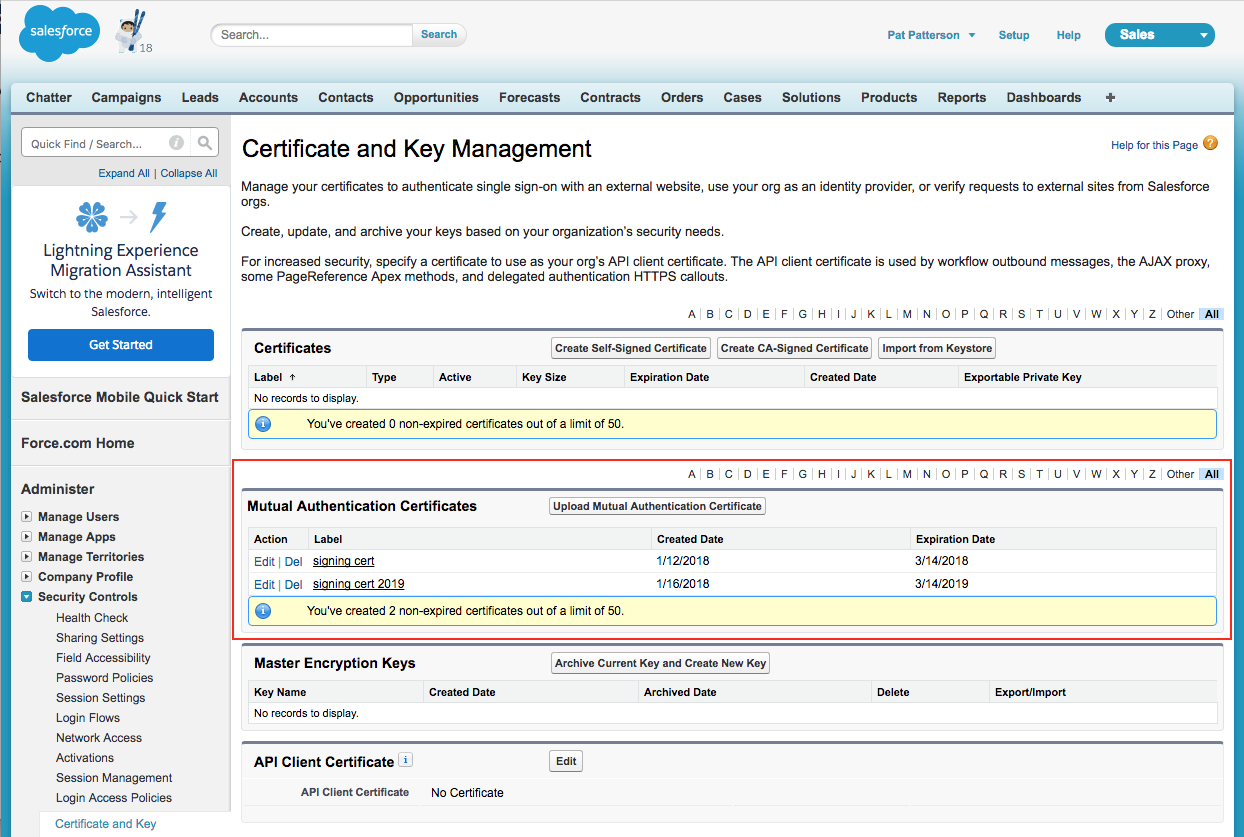
<p>Mutual Authentication is not enabled by default. You must open a support case with Salesforce to enable it. When it is enabled, you will see a <strong>Mutual Authentication Certificates</strong> section at <strong>Setup | Administer | Security Controls | Certificate and Key Management</strong>. <a href="images/MutualAuthentication.png"><img src="images/MutualAuthentication-1024x689.png" alt="Mutual Authentication Configuration" /></a> You must upload a PEM-encoded client certificate to this list. Note that you need only upload the client certificate itself; do not upload a certificate chain. You will also need to create a user profile with the <strong>Enforce SSL/TLS Mutual Authentication</strong> user permission enabled. Clone an existing Salesforce profile and enable <strong>Enforce SSL/TLS Mutual Authentication</strong>. Check that the profile has the Salesforce object permissions that your application will need to access data. Assign the new profile to the user which your app will use to access Salesforce.</p>

<h1 id="testing-mutual-authentication-with-curl">Testing Mutual Authentication with curl</h1>

<p>This was a stumbling block for me for some time. First, despite what the Salesforce documentation (<a href="https://help.salesforce.com/articleView?id=security_keys_uploading_mutual_auth_cert_api.htm&amp;type=5">Configure Your API Client to Use Mutual Authentication</a>) says, the Salesforce login service does <strong>not</strong> support Mutual Authentication. You <strong>cannot</strong> connect to <code class="language-plaintext highlighter-rouge">login.salesforce.com</code> on port <code class="language-plaintext highlighter-rouge">8443</code> as described in the docs. You can, however, send a normal authentication request for a user with Enforce SSL/TLS Mutual Authentication enabled to the default TLS port, <code class="language-plaintext highlighter-rouge">443</code>. The login service responds with a session ID as for any other login request. Mutual Authentication is enforced when you use the session ID with an API endpoint. Let’s try this out. Here’s a SOAP login request - add a username/password and save it to <code class="language-plaintext highlighter-rouge">login.xml</code>:</p>

<div class="language-xml highlighter-rouge"><div class="highlight"><pre class="highlight"><code><span class="cp">&lt;?xml version="1.0" encoding="utf-8" ?&gt;</span>
<span class="nt">&lt;env:Envelope</span> <span class="na">xmlns:xsd=</span><span class="s">"http://www.w3.org/2001/XMLSchema"</span>
 <span class="na">xmlns:xsi=</span><span class="s">"http://www.w3.org/2001/XMLSchema-instance"</span>
 <span class="na">xmlns:env=</span><span class="s">"http://schemas.xmlsoap.org/soap/envelope/"</span><span class="nt">&gt;</span>
  <span class="nt">&lt;env:Body&gt;</span>
    <span class="nt">&lt;n1:login</span> <span class="na">xmlns:n1=</span><span class="s">"urn:partner.soap.sforce.com"</span><span class="nt">&gt;</span>
      <span class="nt">&lt;n1:username&gt;</span>user@example.com<span class="nt">&lt;/n1:username&gt;</span>
      <span class="nt">&lt;n1:password&gt;</span>p455w0rd<span class="nt">&lt;/n1:password&gt;</span>
    <span class="nt">&lt;/n1:login&gt;</span>
  <span class="nt">&lt;/env:Body&gt;</span>
<span class="nt">&lt;/env:Envelope&gt;</span>
</code></pre></div></div>

<p>Now you can send it to the login service with curl:</p>

<div class="language-shell highlighter-rouge"><div class="highlight"><pre class="highlight"><code><span class="nv">$ </span>curl <span class="nt">-s</span> <span class="nt">-k</span> https://login.salesforce.com/services/Soap/u/41.0 <span class="se">\</span>
    <span class="nt">-H</span> <span class="s2">"Content-Type: text/xml; charset=UTF-8"</span> <span class="se">\</span>
    <span class="nt">-H</span> <span class="s2">"SOAPAction: login"</span> <span class="se">\</span>
    <span class="nt">-d</span> @login.xml | xmllint <span class="nt">--format</span> -
&lt;?xml <span class="nv">version</span><span class="o">=</span><span class="s2">"1.0"</span> <span class="nv">encoding</span><span class="o">=</span><span class="s2">"UTF-8"</span>?&gt;
&lt;soapenv:Envelope xmlns:soapenv<span class="o">=</span><span class="s2">"http://schemas.xmlsoap.org/soap/envelope/"</span> <span class="nv">xmlns</span><span class="o">=</span><span class="s2">"urn:partner.soap.sforce.com"</span> xmlns:xsi<span class="o">=</span><span class="s2">"http://www.w3.org/2001/XMLSchema-instance"</span><span class="o">&gt;</span>
  &lt;soapenv:Body&gt;
    &lt;loginResponse&gt;
      &lt;result&gt;
        &lt;metadataServerUrl&gt;https://na30.salesforce.com/services/Soap/m/41.0/00D36000000bLGT&lt;/metadataServerUrl&gt;
        &lt;passwordExpired&gt;false&lt;/passwordExpired&gt;
        &lt;sandbox&gt;false&lt;/sandbox&gt;
        &lt;serverUrl&gt;https://na30.salesforce.com/services/Soap/u/41.0/00D36000000bLGT&lt;/serverUrl&gt;
        &lt;sessionId&gt;00D36000000bLGT!AQQAQMlp30Zpiy6_gSeP1cmQG.0dHlfMcUDg96d8BSRpSb9BwksAABdKsde14ahtDGzKzRXAMroiomST8.UWcg.hp5XXDi4O&lt;/sessionId&gt;
        &lt;userId&gt;00536000006Z51jAAC&lt;/userId&gt;
        &lt;userInfo&gt;
          ...lots of user data...
        &lt;/userInfo&gt;
      &lt;/result&gt;
    &lt;/loginResponse&gt;
  &lt;/soapenv:Body&gt;
&lt;/soapenv:Envelope&gt;
</code></pre></div></div>

<p>We need to create a PEM file for curl with the signing key, client certificate, and all the certificates in its chain <em>except the root</em>. This file looks something like this:</p>

<div class="language-plaintext highlighter-rouge"><div class="highlight"><pre class="highlight"><code>-----BEGIN RSA PRIVATE KEY-----
...base 64 encoded private key data...
-----END RSA PRIVATE KEY-----
-----BEGIN CERTIFICATE-----
...base64 encoded client certificate data...
-----END CERTIFICATE-----
-----BEGIN CERTIFICATE-----
...base64 encoded CA issuing cert...
-----END CERTIFICATE-----
-----BEGIN CERTIFICATE-----
...another base64 encoded CA issuing cert...
-----END CERTIFICATE-----
</code></pre></div></div>

<p>We’ll call the <code class="language-plaintext highlighter-rouge">getUserInfo</code> API. Here’s the SOAP request - add the session ID returned from login and save it as <code class="language-plaintext highlighter-rouge">getuserinfo.xml</code>:</p>

<div class="language-xml highlighter-rouge"><div class="highlight"><pre class="highlight"><code><span class="cp">&lt;?xml version="1.0" encoding="utf-8"?&gt;</span> 
<span class="nt">&lt;soapenv:Envelope</span> <span class="na">xmlns:soapenv=</span><span class="s">"http://schemas.xmlsoap.org/soap/envelope/"</span>
 <span class="na">xmlns:urn=</span><span class="s">"urn:partner.soap.sforce.com"</span><span class="nt">&gt;</span>
  <span class="nt">&lt;soapenv:Header&gt;</span>
    <span class="nt">&lt;urn:SessionHeader&gt;</span>
      <span class="nt">&lt;urn:sessionId&gt;</span>INSERT_YOUR_SESSION_ID_HERE<span class="nt">&lt;/urn:sessionId&gt;</span>
    <span class="nt">&lt;/urn:SessionHeader&gt;</span>
  <span class="nt">&lt;/soapenv:Header&gt;</span>
  <span class="nt">&lt;soapenv:Body&gt;</span>
    <span class="nt">&lt;urn:getUserInfo</span> <span class="nt">/&gt;</span>
  <span class="nt">&lt;/soapenv:Body&gt;</span>
<span class="nt">&lt;/soapenv:Envelope&gt;</span>
</code></pre></div></div>

<p>Now we’re ready to make a mutually authenticated call to a Salesforce API! You’ll need to specify the correct instance, as returned in the login response, in the URL. Note the port number is <code class="language-plaintext highlighter-rouge">8443</code>:</p>

<div class="language-shell highlighter-rouge"><div class="highlight"><pre class="highlight"><code><span class="nv">$ </span>curl <span class="nt">-s</span> <span class="nt">-k</span> https://na30.salesforce.com:8443/services/Soap/u/41.0 <span class="se">\</span>
    <span class="nt">-H</span> <span class="s2">"Content-Type: text/xml; charset=UTF-8"</span> <span class="se">\</span>
    <span class="nt">-H</span> <span class="s2">"SOAPAction: example"</span> <span class="se">\</span>
    <span class="nt">-d</span> @getuserinfo.xml <span class="se">\</span>
    <span class="nt">-E</span> fullcert.pem | xmllint <span class="nt">--format</span> -
&lt;?xml <span class="nv">version</span><span class="o">=</span><span class="s2">"1.0"</span> <span class="nv">encoding</span><span class="o">=</span><span class="s2">"UTF-8"</span>?&gt;
&lt;soapenv:Envelope xmlns:soapenv<span class="o">=</span><span class="s2">"http://schemas.xmlsoap.org/soap/envelope/"</span> <span class="nv">xmlns</span><span class="o">=</span><span class="s2">"urn:partner.soap.sforce.com"</span> xmlns:xsi<span class="o">=</span><span class="s2">"http://www.w3.org/2001/XMLSchema-instance"</span><span class="o">&gt;</span>
  &lt;soapenv:Header&gt;
    &lt;LimitInfoHeader&gt;
      &lt;limitInfo&gt;
        &lt;current&gt;6&lt;/current&gt;
        &lt;limit&gt;15000&lt;/limit&gt;
        &lt;<span class="nb">type</span><span class="o">&gt;</span>API REQUESTS&lt;/type&gt;
      &lt;/limitInfo&gt;
    &lt;/LimitInfoHeader&gt;
  &lt;/soapenv:Header&gt;
  &lt;soapenv:Body&gt;
    &lt;getUserInfoResponse&gt;
      &lt;result&gt;
        ...all the user data...
      &lt;/result&gt;
    &lt;/getUserInfoResponse&gt;
  &lt;/soapenv:Body&gt;
&lt;/soapenv:Envelope&gt;

</code></pre></div></div>

<p>Now let’s look at a couple of failure modes. What happens when we call the <code class="language-plaintext highlighter-rouge">8443</code> port, but don’t pass a client certificate?</p>

<div class="language-shell highlighter-rouge"><div class="highlight"><pre class="highlight"><code><span class="nv">$ </span>curl <span class="nt">-s</span> <span class="nt">-k</span> https://na30.salesforce.com:8443/services/Soap/u/41.0 <span class="se">\</span>
    <span class="nt">-H</span> <span class="s2">"Content-Type: text/xml; charset=UTF-8"</span> <span class="se">\</span>
    <span class="nt">-H</span> <span class="s2">"SOAPAction: example"</span> <span class="se">\</span>
    <span class="nt">-d</span> @getuserinfo.xml
&lt;html&gt;&lt;<span class="nb">head</span><span class="o">&gt;</span>&lt;title&gt;Certificate Error&lt;/title&gt;&lt;/head&gt;&lt;body <span class="nv">bgcolor</span><span class="o">=</span><span class="c">#ffffff text=#3198d8&gt;&lt;center&gt;&lt;img src="http://www.sfdcstatic.com/common/assets/img/logo-company.png"&gt;&lt;p&gt;&lt;h3&gt;Client certificate error:&lt;i&gt;No client certificate provided.&lt;/i&gt;&lt;/h3&gt;&lt;/center&gt;&lt;/body&gt;&lt;/html&gt;</span>
</code></pre></div></div>

<p>Note the HTML response, rather than XML! What about calling the regular <code class="language-plaintext highlighter-rouge">443</code> port with this session ID?</p>

<div class="language-shell highlighter-rouge"><div class="highlight"><pre class="highlight"><code><span class="nv">$ </span>curl <span class="nt">-s</span> <span class="nt">-k</span> https://na30.salesforce.com/services/Soap/u/41.0 <span class="se">\</span>
    <span class="nt">-H</span> <span class="s2">"Content-Type: text/xml; charset=UTF-8"</span> <span class="se">\</span>
    <span class="nt">-H</span> <span class="s2">"SOAPAction: example"</span> <span class="se">\</span>
    <span class="nt">-d</span> @getuserinfo.xml
&lt;?xml <span class="nv">version</span><span class="o">=</span><span class="s2">"1.0"</span> <span class="nv">encoding</span><span class="o">=</span><span class="s2">"UTF-8"</span>?&gt;
&lt;soapenv:Envelope xmlns:soapenv<span class="o">=</span><span class="s2">"http://schemas.xmlsoap.org/soap/envelope/"</span> xmlns:sf<span class="o">=</span><span class="s2">"urn:fault.partner.soap.sforce.com"</span> xmlns:xsi<span class="o">=</span><span class="s2">"http://www.w3.org/2001/XMLSchema-instance"</span><span class="o">&gt;</span>
  &lt;soapenv:Body&gt;
    &lt;soapenv:Fault&gt;
      &lt;faultcode&gt;sf:MUTUAL_AUTHENTICATION_FAILED&lt;/faultcode&gt;
      &lt;faultstring&gt;MUTUAL_AUTHENTICATION_FAILED: This session could not be mutually authenticated <span class="k">for </span>use with the API&lt;/faultstring&gt;
      &lt;detail&gt;
        &lt;sf:UnexpectedErrorFault xsi:type<span class="o">=</span><span class="s2">"sf:UnexpectedErrorFault"</span><span class="o">&gt;</span>
          &lt;sf:exceptionCode&gt;MUTUAL_AUTHENTICATION_FAILED&lt;/sf:exceptionCode&gt;
          &lt;sf:exceptionMessage&gt;This session could not be mutually authenticated <span class="k">for </span>use with the API&lt;/sf:exceptionMessage&gt;
        &lt;/sf:UnexpectedErrorFault&gt;
      &lt;/detail&gt;
    &lt;/soapenv:Fault&gt;
  &lt;/soapenv:Body&gt;
&lt;/soapenv:Envelope&gt;

</code></pre></div></div>

<p>This time we get a much more palatable response! Now you know how to get the basics of Salesforce Mutual Authentication working. In <a href="salesforce-mutual-authentication-part-2-web-service-connector-wsc">part 2 of this series</a>, I look at using Salesforce’s Web Service Connector (WSC) to access the SOAP and Bulk APIs with Mutual Authentication, and in <a href="salesforce-mutual-authentication-part-3-java-http-clients">part 3</a>, I explain how to access the Salesforce REST APIs with common Java HTTP clients such as the Apache and Jetty.</p>]]></content><author><name>user</name></author><category term="Salesforce" /><category term="salesforce" /><category term="tls" /><summary type="html"><![CDATA[Mutual Authentication was introduced by Salesforce in the Winter ‘14 release. As the Salesforce Winter ‘14 release notes explain, mutually authenticated transport layer security (TLS) allows secure server-to-server connections initiated by a client using client certificate authentication, and means that both the client and the server authenticate and verify that they are who they say they are. In this blog post, I’ll show you how to enable Mutual Authentication and perform some basic tests using the curl command line tool. In a future blog post, I’ll show you how to implement Mutual Authentication in your Java apps. In the default case, without Mutual Authentication, when an API client connects to Salesforce via TLS, the client authenticates the server via its TLS certificate, but the TLS connection itself gives the server no information on the client’s identity. After the TLS session is established, the client sends a login request containing its credentials over the secure channel, the Salesforce login service responding with a session ID. The client then sends this session ID with each API request. Mutual Authentication provides an additional layer of security. Each time you connect to a Salesforce API, the server checks that the client’s certificate is valid for the client’s org, as well as checking the validity of the session ID. Note that Mutual Authentication is intended for API use and not for user interface (web browser) use. Before you can use Mutual Authentication, you need to obtain a client certificate. This certificate must be issued by a certificate authority with its root certificate in the Salesforce Outbound Messaging SSL CA Certificates list; Mutual Authentication will not work with a self-signed client certificate. More information is available in the Salesforce document, Set Up a Mutual Authentication Certificate. I bought an SSL certificate from GoDaddy - you can almost certainly find a cheaper alternative if you spend some time looking.]]></summary></entry><entry><title type="html">Uploading data to the Salesforce Wave Analytics Cloud</title><link href="https://blog.superpat.com/uploading-data-to-the-salesforce-wave-analytics-cloud" rel="alternate" type="text/html" title="Uploading data to the Salesforce Wave Analytics Cloud" /><published>2016-03-17T21:18:27+00:00</published><updated>2016-03-17T21:18:27+00:00</updated><id>https://blog.superpat.com/uploading-data-to-the-salesforce-wave-analytics-cloud</id><content type="html" xml:base="https://blog.superpat.com/uploading-data-to-the-salesforce-wave-analytics-cloud"><![CDATA[<p><img src="images/bi_phoneOverDesktop-300x239.png" alt="bi_phoneOverDesktop" class="align-left" />As you might know from <a href="thank-you-for-the-music">my last post</a>, I moved from Salesforce to <a href="https://streamsets.com/">StreamSets</a> a couple of weeks ago. It didn’t take long before I was signing up for a fresh Developer Edition org, though! I’m creating a StreamSets destination to allow me to write data to <a href="http://www.salesforce.com/analytics-cloud/overview/">Wave Analytics</a> datasets, and it’s fair to say that the documentation is… sparse. Working from the <a href="https://developer.salesforce.com/docs/atlas.en-us.bi_dev_guide_ext_data.meta/bi_dev_guide_ext_data/">Wave Analytics External Data API Developer Guide</a> and <a href="https://developer.salesforce.com/docs/atlas.en-us.bi_dev_guide_ext_data_format.meta/bi_dev_guide_ext_data_format/">Wave Analytics External Data Format Reference</a> (why are these separate docs???), and my understanding of how Salesforce works, I was able to put together a working sample Java app that creates a dataset from CSV data. Here’s the code - I explain a few idiosyncrasies below, and reveal the easiest way to get this working with Wave.</p>

<div class="language-java highlighter-rouge"><div class="highlight"><pre class="highlight"><code><span class="kn">package</span> <span class="nn">wsc</span><span class="o">;</span>
<span class="kn">import</span> <span class="nn">java.nio.charset.StandardCharsets</span><span class="o">;</span>
<span class="kn">import</span> <span class="nn">java.util.Arrays</span><span class="o">;</span>
<span class="kn">import</span> <span class="nn">java.util.List</span><span class="o">;</span>
<span class="kn">import</span> <span class="nn">com.sforce.soap.partner.Connector</span><span class="o">;</span>
<span class="kn">import</span> <span class="nn">com.sforce.soap.partner.Error</span><span class="o">;</span>
<span class="kn">import</span> <span class="nn">com.sforce.soap.partner.PartnerConnection</span><span class="o">;</span>
<span class="kn">import</span> <span class="nn">com.sforce.soap.partner.QueryResult</span><span class="o">;</span>
<span class="kn">import</span> <span class="nn">com.sforce.soap.partner.SaveResult</span><span class="o">;</span>
<span class="kn">import</span> <span class="nn">com.sforce.soap.partner.sobject.SObject</span><span class="o">;</span>
<span class="kn">import</span> <span class="nn">com.sforce.ws.ConnectionException</span><span class="o">;</span>
<span class="kn">import</span> <span class="nn">com.sforce.ws.ConnectorConfig</span><span class="o">;</span>

<span class="kd">public</span> <span class="kd">class</span> <span class="nc">Main</span> <span class="o">{</span>
    <span class="c1">// Describes the data we'll be uploading</span>
    <span class="kd">static</span> <span class="nc">String</span> <span class="n">metadataJson</span> <span class="o">=</span> <span class="s">"{\n"</span> <span class="o">+</span> 
        <span class="s">" \"fileFormat\": {\n"</span> <span class="o">+</span> 
            <span class="s">" \"charsetName\": \"UTF-8\",\n"</span> <span class="o">+</span> 
            <span class="s">" \"fieldsDelimitedBy\": \",\",\n"</span> <span class="o">+</span> 
            <span class="s">" \"fieldsEnclosedBy\": \"\\\"\",\n"</span> <span class="o">+</span> 
            <span class="s">" \"numberOfLinesToIgnore\": 1\n"</span> <span class="o">+</span> 
        <span class="s">" },\n"</span> <span class="o">+</span> 
        <span class="s">" \"objects\": [\n"</span> <span class="o">+</span> 
            <span class="s">" {\n"</span> <span class="o">+</span> 
                <span class="s">" \"connector\": \"AcmeCSVConnector\",\n"</span> <span class="o">+</span> 
                <span class="s">" \"description\": \"\",\n"</span> <span class="o">+</span> 
                <span class="s">" \"fields\": [\n"</span> <span class="o">+</span> 
                    <span class="s">" {\n"</span> <span class="o">+</span> 
                        <span class="s">" \"description\": \"\",\n"</span> <span class="o">+</span> 
                        <span class="s">" \"fullyQualifiedName\": \"SalesData.Name\",\n"</span> <span class="o">+</span> 
                        <span class="s">" \"isMultiValue\": false,\n"</span> <span class="o">+</span> 
                        <span class="s">" \"isSystemField\": false,\n"</span> <span class="o">+</span> 
                        <span class="s">" \"isUniqueId\": false,\n"</span> <span class="o">+</span> 
                        <span class="s">" \"label\": \"Account Name\",\n"</span> <span class="o">+</span> 
                        <span class="s">" \"name\": \"Name\",\n"</span> <span class="o">+</span> 
                        <span class="s">" \"type\": \"Text\"\n"</span> <span class="o">+</span> 
                    <span class="s">" },\n"</span> <span class="o">+</span> 
                    <span class="s">" {\n"</span> <span class="o">+</span> 
                        <span class="s">" \"defaultValue\": \"0\",\n"</span> <span class="o">+</span> 
                        <span class="s">" \"description\": \"\",\n"</span> <span class="o">+</span> 
                        <span class="s">" \"format\": \"$#,##0.00\",\n"</span> <span class="o">+</span> 
                        <span class="s">" \"fullyQualifiedName\": \"SalesData.Amount\",\n"</span> <span class="o">+</span> 
                        <span class="s">" \"isSystemField\": false,\n"</span> <span class="o">+</span> 
                        <span class="s">" \"isUniqueId\": false,\n"</span> <span class="o">+</span> 
                        <span class="s">" \"label\": \"Opportunity Amount\",\n"</span> <span class="o">+</span> 
                        <span class="s">" \"name\": \"Amount\",\n"</span> <span class="o">+</span> 
                        <span class="s">" \"precision\": 10,\n"</span> <span class="o">+</span> 
                        <span class="s">" \"scale\": 2,\n"</span> <span class="o">+</span> 
                        <span class="s">" \"type\": \"Numeric\"\n"</span> <span class="o">+</span> 
                    <span class="s">" },\n"</span> <span class="o">+</span> 
                    <span class="s">" {\n"</span> <span class="o">+</span> 
                        <span class="s">" \"description\": \"\",\n"</span> <span class="o">+</span> 
                        <span class="s">" \"fiscalMonthOffset\": 0,\n"</span> <span class="o">+</span> 
                        <span class="s">" \"format\": \"MM/dd/yyyy\",\n"</span> <span class="o">+</span> 
                        <span class="s">" \"fullyQualifiedName\": \"SalesData.CloseDate\",\n"</span> <span class="o">+</span> 
                        <span class="s">" \"isSystemField\": false,\n"</span> <span class="o">+</span> 
                        <span class="s">" \"isUniqueId\": false,\n"</span> <span class="o">+</span> 
                        <span class="s">" \"label\": \"Opportunity Close Date\",\n"</span> <span class="o">+</span> 
                        <span class="s">" \"name\": \"CloseDate\",\n"</span> <span class="o">+</span> 
                        <span class="s">" \"type\": \"Date\"\n"</span> <span class="o">+</span> 
                    <span class="s">" }\n"</span> <span class="o">+</span> 
                <span class="s">" ],\n"</span> <span class="o">+</span> 
                <span class="s">" \"fullyQualifiedName\": \"SalesData\",\n"</span> <span class="o">+</span> 
                <span class="s">" \"label\": \"Sales Data\",\n"</span> <span class="o">+</span> 
                <span class="s">" \"name\": \"SalesData\"\n"</span> <span class="o">+</span> 
            <span class="s">" }\n"</span> <span class="o">+</span> 
        <span class="s">" ]\n"</span> <span class="o">+</span> 
    <span class="s">"}"</span><span class="o">;</span> 

    <span class="c1">// This is the data we'll be uploading</span>
    <span class="kd">static</span> <span class="nc">String</span> <span class="n">data</span> <span class="o">=</span> <span class="s">"Name,Amount,CloseDate\n"</span> <span class="o">+</span> 
        <span class="s">"opportunityA,100.99,6/30/2014\n"</span> <span class="o">+</span> 
        <span class="s">"opportunityB,99.01,1/31/2012\n"</span><span class="o">;</span>

    <span class="c1">// This will be the name of the data set in Wave</span>
    <span class="c1">// Must be unique across the organization</span>
    <span class="kd">static</span> <span class="nc">String</span> <span class="n">datasetName</span> <span class="o">=</span> <span class="s">"tester"</span><span class="o">;</span>

    <span class="c1">// Change these as appropriate</span>
    <span class="kd">static</span> <span class="kd">final</span> <span class="nc">String</span> <span class="no">USERNAME</span> <span class="o">=</span> <span class="s">"user@example.com"</span><span class="o">;</span>
    <span class="kd">static</span> <span class="kd">final</span> <span class="nc">String</span> <span class="no">PASSWORD</span> <span class="o">=</span> <span class="s">"p455w0rd"</span><span class="o">;</span>

    <span class="c1">// Status values indicating that the job is done</span>
    <span class="kd">static</span> <span class="kd">final</span> <span class="nc">List</span><span class="o">&amp;</span><span class="n">lt</span><span class="o">;</span><span class="nc">String</span><span class="o">&amp;</span><span class="n">gt</span><span class="o">;</span> <span class="no">DONE</span> <span class="o">=</span> <span class="o">(</span><span class="nc">List</span><span class="o">&amp;</span><span class="n">lt</span><span class="o">;</span><span class="nc">String</span><span class="o">&amp;</span><span class="n">gt</span><span class="o">;)</span><span class="nc">Arrays</span><span class="o">.</span><span class="na">asList</span><span class="o">(</span> <span class="s">"Completed"</span><span class="o">,</span> <span class="s">"CompletedWithWarnings"</span><span class="o">,</span> <span class="s">"Failed"</span><span class="o">,</span> <span class="s">"NotProcessed"</span> <span class="o">);</span>

    <span class="kd">public</span> <span class="kd">static</span> <span class="kt">void</span> <span class="nf">main</span><span class="o">(</span><span class="nc">String</span><span class="o">[]</span> <span class="n">args</span><span class="o">)</span> <span class="o">{</span>
        <span class="nc">PartnerConnection</span> <span class="n">connection</span><span class="o">;</span>

        <span class="nc">ConnectorConfig</span> <span class="n">config</span> <span class="o">=</span> <span class="k">new</span> <span class="nc">ConnectorConfig</span><span class="o">();</span>
        <span class="n">config</span><span class="o">.</span><span class="na">setUsername</span><span class="o">(</span><span class="no">USERNAME</span><span class="o">);</span>
        <span class="n">config</span><span class="o">.</span><span class="na">setPassword</span><span class="o">(</span><span class="no">PASSWORD</span><span class="o">);</span>

        <span class="k">try</span> <span class="o">{</span>
            <span class="n">connection</span> <span class="o">=</span> <span class="nc">Connector</span><span class="o">.</span><span class="na">newConnection</span><span class="o">(</span><span class="n">config</span><span class="o">);</span>
            <span class="nc">System</span><span class="o">.</span><span class="na">out</span><span class="o">.</span><span class="na">println</span><span class="o">(</span><span class="s">"Successfully authenticated as "</span><span class="o">+</span><span class="n">config</span><span class="o">.</span><span class="na">getUsername</span><span class="o">());</span>

            <span class="c1">// Wave time!</span>

            <span class="c1">// First, we create an InsightsExternalData job</span>
            <span class="nc">SObject</span> <span class="n">sobj</span> <span class="o">=</span> <span class="k">new</span> <span class="nc">SObject</span><span class="o">();</span>
            <span class="n">sobj</span><span class="o">.</span><span class="na">setType</span><span class="o">(</span><span class="s">"InsightsExternalData"</span><span class="o">);</span>
            <span class="n">sobj</span><span class="o">.</span><span class="na">setField</span><span class="o">(</span><span class="s">"Format"</span><span class="o">,</span><span class="s">"Csv"</span><span class="o">);</span>
            <span class="n">sobj</span><span class="o">.</span><span class="na">setField</span><span class="o">(</span><span class="s">"EdgemartAlias"</span><span class="o">,</span> <span class="n">datasetName</span><span class="o">);</span>
            <span class="n">sobj</span><span class="o">.</span><span class="na">setField</span><span class="o">(</span><span class="s">"MetadataJson"</span><span class="o">,</span> <span class="n">metadataJson</span><span class="o">.</span><span class="na">getBytes</span><span class="o">(</span><span class="nc">StandardCharsets</span><span class="o">.</span><span class="na">UTF_8</span><span class="o">));</span>
            <span class="n">sobj</span><span class="o">.</span><span class="na">setField</span><span class="o">(</span><span class="s">"Operation"</span><span class="o">,</span><span class="s">"Overwrite"</span><span class="o">);</span>
            <span class="n">sobj</span><span class="o">.</span><span class="na">setField</span><span class="o">(</span><span class="s">"Action"</span><span class="o">,</span><span class="s">"None"</span><span class="o">);</span>

            <span class="nc">String</span> <span class="n">parentID</span> <span class="o">=</span> <span class="kc">null</span><span class="o">;</span>
            <span class="nc">SaveResult</span><span class="o">[]</span> <span class="n">results</span> <span class="o">=</span> <span class="n">connection</span><span class="o">.</span><span class="na">create</span><span class="o">(</span><span class="k">new</span> <span class="nc">SObject</span><span class="o">[]</span> <span class="o">{</span> <span class="n">sobj</span> <span class="o">});</span>

            <span class="k">for</span><span class="o">(</span><span class="nc">SaveResult</span> <span class="nl">sv:</span><span class="n">results</span><span class="o">)</span> <span class="o">{</span>
                <span class="k">if</span><span class="o">(</span><span class="n">sv</span><span class="o">.</span><span class="na">isSuccess</span><span class="o">())</span> <span class="o">{</span>
                    <span class="n">parentID</span> <span class="o">=</span> <span class="n">sv</span><span class="o">.</span><span class="na">getId</span><span class="o">();</span>
                    <span class="nc">System</span><span class="o">.</span><span class="na">out</span><span class="o">.</span><span class="na">println</span><span class="o">(</span><span class="s">"Success creating InsightsExternalData: "</span><span class="o">+</span><span class="n">parentID</span><span class="o">);</span> 
                <span class="o">}</span> <span class="k">else</span> <span class="o">{</span>
                    <span class="k">for</span> <span class="o">(</span><span class="nc">Error</span> <span class="n">e</span> <span class="o">:</span> <span class="n">sv</span><span class="o">.</span><span class="na">getErrors</span><span class="o">())</span> <span class="o">{</span>
                        <span class="nc">System</span><span class="o">.</span><span class="na">out</span><span class="o">.</span><span class="na">println</span><span class="o">(</span><span class="s">"Error: "</span> <span class="o">+</span> <span class="n">e</span><span class="o">.</span><span class="na">getMessage</span><span class="o">());</span>
                    <span class="o">}</span>
                    <span class="nc">System</span><span class="o">.</span><span class="na">exit</span><span class="o">(</span><span class="mi">1</span><span class="o">);</span>
                <span class="o">}</span>
            <span class="o">}</span>

            <span class="c1">// Now upload some actual data. You can do this as many times as necessary,</span>
            <span class="c1">// subject to the Wave External Data API Limits</span>
            <span class="n">sobj</span> <span class="o">=</span> <span class="k">new</span> <span class="nc">SObject</span><span class="o">();</span>
            <span class="n">sobj</span><span class="o">.</span><span class="na">setType</span><span class="o">(</span><span class="s">"InsightsExternalDataPart"</span><span class="o">);</span>
            <span class="n">sobj</span><span class="o">.</span><span class="na">setField</span><span class="o">(</span><span class="s">"DataFile"</span><span class="o">,</span> <span class="n">data</span><span class="o">.</span><span class="na">getBytes</span><span class="o">(</span><span class="nc">StandardCharsets</span><span class="o">.</span><span class="na">UTF_8</span><span class="o">));</span>
            <span class="n">sobj</span><span class="o">.</span><span class="na">setField</span><span class="o">(</span><span class="s">"InsightsExternalDataId"</span><span class="o">,</span> <span class="n">parentID</span><span class="o">);</span>
            <span class="n">sobj</span><span class="o">.</span><span class="na">setField</span><span class="o">(</span><span class="s">"PartNumber"</span><span class="o">,</span> <span class="mi">1</span><span class="o">);</span>

            <span class="n">results</span> <span class="o">=</span> <span class="n">connection</span><span class="o">.</span><span class="na">create</span><span class="o">(</span><span class="k">new</span> <span class="nc">SObject</span><span class="o">[]</span> <span class="o">{</span> <span class="n">sobj</span> <span class="o">});</span>

            <span class="k">for</span><span class="o">(</span><span class="nc">SaveResult</span> <span class="nl">sv:</span><span class="n">results</span><span class="o">)</span> <span class="o">{</span>
                <span class="k">if</span><span class="o">(</span><span class="n">sv</span><span class="o">.</span><span class="na">isSuccess</span><span class="o">())</span> <span class="o">{</span>
                    <span class="nc">String</span> <span class="n">rowId</span> <span class="o">=</span> <span class="n">sv</span><span class="o">.</span><span class="na">getId</span><span class="o">();</span>
                    <span class="nc">System</span><span class="o">.</span><span class="na">out</span><span class="o">.</span><span class="na">println</span><span class="o">(</span><span class="s">"Success creating InsightsExternalDataPart: "</span><span class="o">+</span><span class="n">rowId</span><span class="o">);</span>
                <span class="o">}</span> <span class="k">else</span> <span class="o">{</span>
                    <span class="k">for</span> <span class="o">(</span><span class="nc">Error</span> <span class="n">e</span> <span class="o">:</span> <span class="n">sv</span><span class="o">.</span><span class="na">getErrors</span><span class="o">())</span> <span class="o">{</span>
                        <span class="nc">System</span><span class="o">.</span><span class="na">out</span><span class="o">.</span><span class="na">println</span><span class="o">(</span><span class="s">"Error: "</span> <span class="o">+</span> <span class="n">e</span><span class="o">.</span><span class="na">getMessage</span><span class="o">());</span>
                    <span class="o">}</span>
                    <span class="nc">System</span><span class="o">.</span><span class="na">exit</span><span class="o">(</span><span class="mi">1</span><span class="o">);</span>
                <span class="o">}</span>
            <span class="o">}</span>

            <span class="c1">// Instruct Wave to start processing the data</span>
            <span class="n">sobj</span> <span class="o">=</span> <span class="k">new</span> <span class="nc">SObject</span><span class="o">();</span>
            <span class="n">sobj</span><span class="o">.</span><span class="na">setType</span><span class="o">(</span><span class="s">"InsightsExternalData"</span><span class="o">);</span>
            <span class="n">sobj</span><span class="o">.</span><span class="na">setField</span><span class="o">(</span><span class="s">"Action"</span><span class="o">,</span><span class="s">"Process"</span><span class="o">);</span>
            <span class="n">sobj</span><span class="o">.</span><span class="na">setId</span><span class="o">(</span><span class="n">parentID</span><span class="o">);</span>

            <span class="n">results</span> <span class="o">=</span> <span class="n">connection</span><span class="o">.</span><span class="na">update</span><span class="o">(</span><span class="k">new</span> <span class="nc">SObject</span><span class="o">[]</span> <span class="o">{</span> <span class="n">sobj</span> <span class="o">});</span>

            <span class="k">for</span><span class="o">(</span><span class="nc">SaveResult</span> <span class="nl">sv:</span><span class="n">results</span><span class="o">)</span> <span class="o">{</span>
                <span class="k">if</span><span class="o">(</span><span class="n">sv</span><span class="o">.</span><span class="na">isSuccess</span><span class="o">())</span> <span class="o">{</span>
                    <span class="nc">String</span> <span class="n">rowId</span> <span class="o">=</span> <span class="n">sv</span><span class="o">.</span><span class="na">getId</span><span class="o">();</span>
                    <span class="nc">System</span><span class="o">.</span><span class="na">out</span><span class="o">.</span><span class="na">println</span><span class="o">(</span><span class="s">"Success updating InsightsExternalData: "</span><span class="o">+</span><span class="n">rowId</span><span class="o">);</span>
                <span class="o">}</span> <span class="k">else</span> <span class="o">{</span>
                    <span class="k">for</span> <span class="o">(</span><span class="nc">Error</span> <span class="n">e</span> <span class="o">:</span> <span class="n">sv</span><span class="o">.</span><span class="na">getErrors</span><span class="o">())</span> <span class="o">{</span>
                        <span class="nc">System</span><span class="o">.</span><span class="na">out</span><span class="o">.</span><span class="na">println</span><span class="o">(</span><span class="s">"Error: "</span> <span class="o">+</span> <span class="n">e</span><span class="o">.</span><span class="na">getMessage</span><span class="o">());</span>
                    <span class="o">}</span>
                    <span class="nc">System</span><span class="o">.</span><span class="na">exit</span><span class="o">(</span><span class="mi">1</span><span class="o">);</span>
                <span class="o">}</span>
            <span class="o">}</span>

            <span class="c1">// Periodically check whether the job is done</span>
            <span class="kt">boolean</span> <span class="n">done</span> <span class="o">=</span> <span class="kc">false</span><span class="o">;</span>
            <span class="kt">int</span> <span class="n">sleepTime</span> <span class="o">=</span> <span class="mi">1000</span><span class="o">;</span>
            <span class="k">while</span> <span class="o">(!</span><span class="n">done</span><span class="o">)</span> <span class="o">{</span>
                <span class="k">try</span> <span class="o">{</span>
                    <span class="nc">Thread</span><span class="o">.</span><span class="na">sleep</span><span class="o">(</span><span class="n">sleepTime</span><span class="o">);</span>
                    <span class="n">sleepTime</span> <span class="o">*=</span> <span class="mi">2</span><span class="o">;</span>
                <span class="o">}</span> <span class="k">catch</span><span class="o">(</span><span class="nc">InterruptedException</span> <span class="n">ex</span><span class="o">)</span> <span class="o">{</span>
                    <span class="nc">Thread</span><span class="o">.</span><span class="na">currentThread</span><span class="o">().</span><span class="na">interrupt</span><span class="o">();</span>
                <span class="o">}</span>

                <span class="nc">QueryResult</span> <span class="n">queryResults</span> <span class="o">=</span> <span class="n">connection</span><span class="o">.</span><span class="na">query</span><span class="o">(</span> <span class="s">"SELECT Status FROM InsightsExternalData WHERE Id = '"</span> <span class="o">+</span> <span class="n">parentID</span> <span class="o">+</span> <span class="s">"'"</span> <span class="o">);</span>

                <span class="k">if</span> <span class="o">(</span><span class="n">queryResults</span><span class="o">.</span><span class="na">getSize</span><span class="o">()</span> <span class="o">&amp;</span><span class="n">gt</span><span class="o">;</span> <span class="mi">0</span><span class="o">)</span> <span class="o">{</span>
                    <span class="k">for</span> <span class="o">(</span><span class="nc">SObject</span> <span class="nl">s:</span> <span class="n">queryResults</span><span class="o">.</span><span class="na">getRecords</span><span class="o">())</span> <span class="o">{</span>
                        <span class="nc">String</span> <span class="n">status</span> <span class="o">=</span> <span class="o">(</span><span class="nc">String</span><span class="o">)</span><span class="n">s</span><span class="o">.</span><span class="na">getField</span><span class="o">(</span><span class="s">"Status"</span><span class="o">);</span>
                        <span class="nc">System</span><span class="o">.</span><span class="na">out</span><span class="o">.</span><span class="na">println</span><span class="o">(</span><span class="n">s</span><span class="o">.</span><span class="na">getField</span><span class="o">(</span><span class="s">"Status"</span><span class="o">));</span>
                        <span class="k">if</span> <span class="o">(</span><span class="no">DONE</span><span class="o">.</span><span class="na">contains</span><span class="o">(</span><span class="n">status</span><span class="o">))</span> <span class="o">{</span>
                            <span class="n">done</span> <span class="o">=</span> <span class="kc">true</span><span class="o">;</span>
                            <span class="nc">String</span> <span class="n">statusMessage</span> <span class="o">=</span> <span class="o">(</span><span class="nc">String</span><span class="o">)</span><span class="n">s</span><span class="o">.</span><span class="na">getField</span><span class="o">(</span><span class="s">"StatusMessage"</span><span class="o">);</span>
                            <span class="k">if</span> <span class="o">(</span><span class="n">statusMessage</span> <span class="o">!=</span> <span class="kc">null</span><span class="o">)</span> <span class="o">{</span>
                                <span class="nc">System</span><span class="o">.</span><span class="na">out</span><span class="o">.</span><span class="na">println</span><span class="o">(</span><span class="n">statusMessage</span><span class="o">);</span>
                            <span class="o">}</span>
                        <span class="o">}</span>
                    <span class="o">}</span>
                <span class="o">}</span> <span class="k">else</span> <span class="o">{</span>
                    <span class="nc">System</span><span class="o">.</span><span class="na">out</span><span class="o">.</span><span class="na">println</span><span class="o">(</span><span class="s">"Can't find InsightsExternalData with Id "</span> <span class="o">+</span> <span class="n">parentID</span><span class="o">);</span>
                <span class="o">}</span>
            <span class="o">}</span>
        <span class="o">}</span> <span class="k">catch</span> <span class="o">(</span><span class="nc">ConnectionException</span> <span class="n">e1</span><span class="o">)</span> <span class="o">{</span>
            <span class="n">e1</span><span class="o">.</span><span class="na">printStackTrace</span><span class="o">();</span>
        <span class="o">}</span>
    <span class="o">}</span>
<span class="o">}</span>
</code></pre></div></div>

<ul>
  <li>Lines 7-14 - I’m using the WSC with the SOAP Partner API, just because I’m working in Java, and that was what was used in the bits of sample code included in the docs.</li>
  <li>Lines 19-72 - this is the metadata that describes the CSV you’re uploading. This is optional, but recommended.</li>
  <li>Lines 75-78 - CSV is the only format currently supported, though the docs reserve a binary format for Salesforce use.</li>
  <li>Line 82 - the dataset name must be unique across your org.</li>
  <li>Lines 85-86 - change these to your login credentials.</li>
  <li>Line 117 - the API wants base64-encoded data, so you’d likely try encoding the data yourself and passing the resulting string here, resulting in an error message. Instead you have to pass the raw bytes of the unencoded string and let the WSC library sort it out.</li>
  <li>Lines 137-154 - you can repeat this block in a loop as many times as necessary.</li>
</ul>

<p>You will need the WSC jar, and the SOAP Partner API jar - follow <a href="https://twitter.com/jeffdonthemic">Jeff Douglas</a>’ excellent article <a href="https://developer.salesforce.com/page/Introduction_to_the_Force.com_Web_Services_Connector">Introduction to the Force.com Web Services Connector</a> for details on setting this up - use the ‘uber’ JAR as it contains all the required dependencies. The sample above used Jeff’s Partner API sample as a starting point - thanks, Jeff! The fastest way to get started with Wave is, of course, <a href="https://developer.salesforce.com/trailhead/">Salesforce Trailhead</a>. Follow the <a href="https://developer.salesforce.com/trailhead/en/module/wave_analytics_basics">Wave Analytics Basics module</a> and you’ll end up with a Wave-enabled Developer Edition all ready to go. Once you have your Wave DE org, and the sample app, you should be able to run it and see something like:</p>

<div class="language-plaintext highlighter-rouge"><div class="highlight"><pre class="highlight"><code>Successfully authenticated as wave@patorg.com
Success creating InsightsExternalData: 06V360000008RIlEAM
Success creating InsightsExternalDataPart: 06W36000000PDXFEA4
Success updating InsightsExternalData: 06V360000008RIlEAM
InProgress
InProgress
Completed
</code></pre></div></div>

<p>If you go look in the Wave Analytics app, you should see the ‘tester’ dataset: <img src="images/WaveAnalytics-1024x646.png" alt="WaveAnalytics" /> Click on ‘tester’ and you’ll see the ‘big blue line’: <img src="images/TesterDataset-1024x408.png" alt="TesterDataset" /> Now you can drill into the data (all 2 rows of it!) by account name, close date etc. You could, of course, extend the above code to accept a CSV filename and dataset name on the command line, and create all sorts of interesting extensions. Follow the <a href="https://streamsets.com/blog/">StreamSets blog</a> to learn where I plan to go with this!</p>]]></content><author><name>user</name></author><category term="Salesforce" /><category term="StreamSets" /><category term="analytics" /><category term="salesforce" /><category term="wave" /><summary type="html"><![CDATA[As you might know from my last post, I moved from Salesforce to StreamSets a couple of weeks ago. It didn’t take long before I was signing up for a fresh Developer Edition org, though! I’m creating a StreamSets destination to allow me to write data to Wave Analytics datasets, and it’s fair to say that the documentation is… sparse. Working from the Wave Analytics External Data API Developer Guide and Wave Analytics External Data Format Reference (why are these separate docs???), and my understanding of how Salesforce works, I was able to put together a working sample Java app that creates a dataset from CSV data. Here’s the code - I explain a few idiosyncrasies below, and reveal the easiest way to get this working with Wave.]]></summary></entry><entry><title type="html">Thank You For The Music</title><link href="https://blog.superpat.com/thank-you-for-the-music" rel="alternate" type="text/html" title="Thank You For The Music" /><published>2016-03-04T05:45:52+00:00</published><updated>2016-03-04T05:45:52+00:00</updated><id>https://blog.superpat.com/thank-you-for-the-music</id><content type="html" xml:base="https://blog.superpat.com/thank-you-for-the-music"><![CDATA[<p><a href="moving-on-from-huawei">I joined the developer evangelism team at Salesforce</a> in October 2010, nearly five and a half years ago. It’s been a fantastic run, but it’s time for me to move on, and today will be my last day with Salesforce. Over the past few years I’ve worked with Apex, Visualforce, the Force.com APIs, Heroku, Salesforce Identity and, most recently, the Internet of Things, but, more than any of the technologies, it’s the <em>people</em> that have made Salesforce special for me. I’ve worked with the <a href="https://developer.salesforce.com/">best developer marketing team in the industry</a>, and the <a href="https://success.salesforce.com/">most awesome community of admins and developers</a>. So, what next? Starting on Monday I’ll be ‘Community Champion’ at <a href="https://streamsets.com/">StreamSets</a>, a San Francisco-based startup focused on open source big data ingest. I’ll be blogging at their <a href="https://streamsets.com/blog/">Continuous Ingest Blog</a>, speaking at conferences (including <a href="http://gluecon.com/">GlueCon</a>, coming up in May), <a href="https://twitter.com/metadaddy">tweeting</a>, and learning all about this ‘big data’ thing I keep hearing about. Thank you, Salesforce, for my #dreamjob, and all the fun times over the years. It’s been a blast!</p>
<iframe src="https://www.youtube.com/embed/0dcbw4IEY5w" width="420" height="315" frameborder="0" allowfullscreen="allowfullscreen"></iframe>]]></content><author><name>user</name></author><category term="About Me" /><category term="salesforce" /><summary type="html"><![CDATA[I joined the developer evangelism team at Salesforce in October 2010, nearly five and a half years ago. It’s been a fantastic run, but it’s time for me to move on, and today will be my last day with Salesforce. Over the past few years I’ve worked with Apex, Visualforce, the Force.com APIs, Heroku, Salesforce Identity and, most recently, the Internet of Things, but, more than any of the technologies, it’s the people that have made Salesforce special for me. I’ve worked with the best developer marketing team in the industry, and the most awesome community of admins and developers. So, what next? Starting on Monday I’ll be ‘Community Champion’ at StreamSets, a San Francisco-based startup focused on open source big data ingest. I’ll be blogging at their Continuous Ingest Blog, speaking at conferences (including GlueCon, coming up in May), tweeting, and learning all about this ‘big data’ thing I keep hearing about. Thank you, Salesforce, for my #dreamjob, and all the fun times over the years. It’s been a blast!]]></summary></entry><entry><title type="html">Visualforce on Chromecast, as a Service!</title><link href="https://blog.superpat.com/visualforce-on-chromecast-as-a-service" rel="alternate" type="text/html" title="Visualforce on Chromecast, as a Service!" /><published>2014-03-25T16:54:31+00:00</published><updated>2014-03-25T16:54:31+00:00</updated><id>https://blog.superpat.com/visualforce-on-chromecast-as-a-service</id><content type="html" xml:base="https://blog.superpat.com/visualforce-on-chromecast-as-a-service"><![CDATA[<p>After writing <a href="display-any-visualforce-page-on-google-chromecast">my last blog entry, on how to display any Visualforce Page on Google Chromecast</a>, it occured to me that I could run the app on Heroku. So, if you have a <a href="http://www.google.com/chromecast">Google Chromecast</a>, and a Salesforce login with API access enabled, you can try it out right now. Go to <a href="https://vf-chromecast.herokuapp.com/">https://vf-chromecast.herokuapp.com/</a>; you’ll see this page: <img src="images/Screen-Shot-2014-03-25-at-4.30.42-PM-1024x793.png" alt="Visualforce on Chromecast" /> Follow the instructions, log in, authorize the app to access your data, and you’ll be able to select a Visualforce Page to ‘cast’ to your TV. <a href="images/Screen-Shot-2014-03-25-at-4.32.32-PM.png"><img src="images/Screen-Shot-2014-03-25-at-4.32.32-PM-1024x793.png" alt="Select a Visualforce Page" /></a> One new feature here - if you select a Visualforce Page that uses a standard controller, and is thus expecting a record ID as a parameter, you’ll get the opportunity to select a record. For simplicity, I’m just showing the first 10 records returned by the database. <a href="images/Screen-Shot-2014-03-25-at-4.33.38-PM.png"><img src="images/Screen-Shot-2014-03-25-at-4.33.38-PM-1024x793.png" alt="Select a Record" /></a> Choose a record, hit send, and you’ll see the page displayed by the Chromecast, in this case, it’s a Mini Hack we ran a couple of Dreamforces ago: <a href="images/IMG_1651.jpg"><img src="images/IMG_1651-1024x768.jpg" alt="Success" /></a> As always, <a href="https://github.com/metadaddy-sfdc/CastDemo">the code is on GitHub</a>. Having done <a href="http://blogs.developerforce.com/developer-relations/2013/03/controlling-physical-devices-via-approval-processes-in-force-com.html">Raspberry Pi</a>, <a href="http://blogs.developerforce.com/developer-relations/2014/01/visualizing-salesforce-data-in-minecraft.html">Minecraft</a>, and now Chromecast, I’m looking for new ideas for interesting Salesforce integrations. Leave a comment if you think of one!</p>]]></content><author><name>user</name></author><category term="Uncategorized" /><category term="Chromecast" /><category term="force.com" /><category term="Visualforce" /><summary type="html"><![CDATA[After writing my last blog entry, on how to display any Visualforce Page on Google Chromecast, it occured to me that I could run the app on Heroku. So, if you have a Google Chromecast, and a Salesforce login with API access enabled, you can try it out right now. Go to https://vf-chromecast.herokuapp.com/; you’ll see this page: Follow the instructions, log in, authorize the app to access your data, and you’ll be able to select a Visualforce Page to ‘cast’ to your TV. One new feature here - if you select a Visualforce Page that uses a standard controller, and is thus expecting a record ID as a parameter, you’ll get the opportunity to select a record. For simplicity, I’m just showing the first 10 records returned by the database. Choose a record, hit send, and you’ll see the page displayed by the Chromecast, in this case, it’s a Mini Hack we ran a couple of Dreamforces ago: As always, the code is on GitHub. Having done Raspberry Pi, Minecraft, and now Chromecast, I’m looking for new ideas for interesting Salesforce integrations. Leave a comment if you think of one!]]></summary></entry><entry><title type="html">Display ANY Visualforce Page on Google Chromecast</title><link href="https://blog.superpat.com/display-any-visualforce-page-on-google-chromecast" rel="alternate" type="text/html" title="Display ANY Visualforce Page on Google Chromecast" /><published>2014-03-21T15:22:47+00:00</published><updated>2014-03-21T15:22:47+00:00</updated><id>https://blog.superpat.com/display-any-visualforce-page-on-google-chromecast</id><content type="html" xml:base="https://blog.superpat.com/display-any-visualforce-page-on-google-chromecast"><![CDATA[<p><a href="getting-started-with-chromecast-on-visualforce">Last time</a>, I described how I ran a simple ‘Hello World’ application, served from a Force.com Site, on the <a href="http://www.google.com/chromecast">Google Chromecast</a>, a $35 digital media player. In this blog entry, I’ll show you how to show <em>any</em> Visualforce page, not just a public page on a Force.com Site, on the Chromecast.</p>
<p><img src="images/IMG_1579.jpg" alt="IMG_1579" /></p>

<p>A quick recap… (Skip this paragraph if you’ve already read <a href="getting-started-with-chromecast-on-visualforce">the previous entry</a>). Chromecast is actually a tiny wifi-enabled Linux computer, running the Chrome browser, connected to a TV or monitor via HDMI. A ‘receiver’ app, written in HTML5, runs on the device, which has no input capability (mouse/keyboard), while a ‘sender’ app runs on a ‘second screen’ such as a laptop, smartphone, or tablet, the two apps communicating across the local wifi network via a message bus. The sender app typically allows the user to navigate content and control the media stream shown on the Chromecast (the ‘first screen’). The <a href="https://github.com/googlecast/CastHelloText-chrome">CastHelloText-chrome</a> sample allows the user to type a message in the sender app on the first screen, and displays it on the second screen via the receiver app. Given a working sample, the next question was, how to access data from the receiver app? The core problem is that the Chromecast can only load a public web page - it can’t login to Force.com. The sender app runs on a desktop browser, smartphone or tablet, however, so perhaps it would be possible to login there, and send a session ID to the receiver app via the message bus? I worked through a few alternatives before I hit on the optimal solution:</p>

<h3 id="load-the-visualforce-page-via-frontdoorjsp">Load the Visualforce page via Frontdoor.jsp</h3>

<p>Frontdoor.jsp, which has existed for some time, but has only been <a href="http://docs.releasenotes.salesforce.com/en-us/winter14/release-notes/security_frontdoorjsp.htm">formally documented and supported since the Winter ‘14 Salesforce release</a>, “gives users access to Salesforce from a custom Web interface, such as a remote access Force.com site or other API integration, using their existing session ID and the server URL”. To authenticate users with frontdoor.jsp, you pass the server URL and session ID to frontdoor.jsp in this format: <code class="language-plaintext highlighter-rouge">https://instance.salesforce.com/secur/frontdoor.jsp?sid=_session_ID_&amp;retURL=_optional_relative_url_to_open_</code> Sounds perfect! The only problem is that the session ID you pass to frontdoor.jsp must come from one of:</p>

<ul>
  <li>The access_token from an OAuth authentication (obtained with ‘web’ or ‘full’ scope)</li>
  <li>The LoginResult returned from a SOAP API login() call</li>
  <li>The Apex UserInfo.getSessionId()</li>
</ul>

<p>The session ID from a Visualforce page or controller isn’t going to cut it here. So, I reached for <a href="https://twitter.com/kevino80">Kevin O’Hara</a>’s excellent <a href="https://github.com/kevinohara80/nforce">nforce</a> and built a quick Node.js sender app that has the user authorize API access via OAuth (including web scope!), runs a query for the list of Visualforce Pages in the org and presents them as a drop-down list. You can choose a Visualforce Page, hit ‘Send’, and the sender app constructs the frontdoor URL with the OAuth access token and relative URL for the page and sends it to the receiver via the message bus.</p>

<p><img src="images/Screen-Shot-2014-03-21-at-12.09.08-PM.png" alt="Screen Shot 2014-03-21 at 12.09.08 PM" /></p>

<p>Note that, while you can indeed send any Visualforce page to the Chromecast for display, remember that the Chromecast doesn’t have any capacity for user input, so tables and charts work best. I tried a couple of approaches for the receiver app; first I simply redirected to the frontdoor URL, but then I realized that it would be more useful to load the frontdoor URL into a full-page iframe. That way, the receiver app could stay running in the ‘top’ document, ready to receive a different URL, and periodically reloading the iframe so that the session doesn’t time out. Here it is in action: &lt;iframe src="//www.youtube.com/embed/0tWnaOYqUzM" height="360" width="480" allowfullscreen="" frameborder="0"&gt;&lt;/iframe&gt;All of the code is in my <a href="https://github.com/metadaddy-sfdc/CastDemo">CastDemo project on GitHub</a>. Feel free to fork it, extend it, and let me know in the comments how it works out. When it came down to the code, this was a very straightforward integration; the vast majority of the work was thinking around the problem of how to have a device with no input capability authenticate and load a Visualforce page. Now that Frontdoor.jsp is documented and supported, it’s an essential tool for the advanced Force.com developer. <em>POSTSCRIPT:</em> Almost as soon as I hit ‘publish’ on this post, I realized I could push the app to <a href="http://heroku.com/">Heroku</a>, and allow <em>anyone</em> with a Chromecast and API access to Salesforce to see their Visualforce Pages on TV. <a href="visualforce-on-chromecast-as-a-service">Read the next installment here</a>.</p>]]></content><author><name>user</name></author><category term="Uncategorized" /><category term="Chromecast" /><category term="force.com" /><category term="Visualforce" /><summary type="html"><![CDATA[Last time, I described how I ran a simple ‘Hello World’ application, served from a Force.com Site, on the Google Chromecast, a $35 digital media player. In this blog entry, I’ll show you how to show any Visualforce page, not just a public page on a Force.com Site, on the Chromecast.]]></summary></entry><entry><title type="html">Getting Started with Chromecast on Visualforce</title><link href="https://blog.superpat.com/getting-started-with-chromecast-on-visualforce" rel="alternate" type="text/html" title="Getting Started with Chromecast on Visualforce" /><published>2014-03-07T11:03:49+00:00</published><updated>2014-03-07T11:03:49+00:00</updated><id>https://blog.superpat.com/getting-started-with-chromecast-on-visualforce</id><content type="html" xml:base="https://blog.superpat.com/getting-started-with-chromecast-on-visualforce"><![CDATA[<p>About a month ago, Google <a href="http://googledevelopers.blogspot.com/2014/02/ready-to-cast-chromecast-now-open-to.html">released the Google Cast SDK</a>, allowing developers to create apps that run on the <a href="http://www.google.com/chromecast">Chromecast</a>, a $35 digital media player. The primary use case of Chromecast is to stream media - movies, TV shows, music and the like - via wifi to your HDMI TV/monitor, but, looking at the SDK docs, it became apparent that the Chromecast is actually a miniature (‘<a href="http://en.wikipedia.org/wiki/System_on_a_chip">system-on-chip</a>’) computer running <a href="http://en.wikipedia.org/wiki/Chrome_OS">Chrome OS</a> (a Linux variant) and the Chrome browser. If it’s running a browser, I wondered, could it load <a href="http://wiki.developerforce.com/page/An_Introduction_to_Visualforce">Visualforce</a> pages from Salesforce and display, for example, a chart based on live data? If so, this would allow any HDMI-capable TV or monitor to be used as a dashboard at very low cost. When I was given a Chromecast by a colleague (thanks, <a href="https://twitter.com/cloudysan">Sandeep</a>!) in return for alpha testing his app, I decided to find out! This first blog post explains how I ran a simple ‘Hello World’ sample on the Chromecast, loading the app from Visualforce. Next time, I’ll show you how I pulled data from Salesforce via the REST API and showed it as a chart. <a href="images/Chromecast.jpg"><img src="images/Chromecast-300x225.jpg" alt="Chromecast" /></a> Chromecast setup was pretty straightforward - a matter of connecting the device to an HDMI input on my TV and a USB power source, downloading and running the Chromecast app, and following the prompts to complete setup. The Chromecast app locates the device on the local network using the <a href="http://en.wikipedia.org/wiki/DIscovery_And_Launch">DIAL</a> protocol. Note that, since the app is communicating directly with the device, it won’t work on wifi networks that enforce AP/Client Isolation (many offices and hotels). After installing the <a href="https://chrome.google.com/webstore/detail/google-cast/boadgeojelhgndaghljhdicfkmllpafd">Cast Extension for Chrome</a> and verifying that the Chromecast could display content from YouTube, it was time to put the device into <a href="https://developers.google.com/cast/docs/registration#RegisterDevice">development mode</a>! This actually proved to be pretty tricky - you need to enter the Chromecast’s serial number into the Google Cast SDK Developer Console. Sounds straightforward, but the serial number is laser etched into the Chromecast’s black plastic case in very small type indeed. I entered it incorrectly the first time round, and had to take a photo of the serial number and zoom in to see that the last character was an S and not an 8! <a href="images/Serial.png"><img src="images/Serial-241x300.png" alt="Serial" /></a> Another gotcha I encountered is that it’s necessary to go into the Chromecast settings (in the Chromecast app) and enable <strong>Send this Chromecast’s serial number when checking for updates</strong>. This information is on a <a href="https://developers.google.com/cast/docs/developers#Get_started">separate page</a> from the device registration instructions, so it’s easy to miss. Now my Chromecast showed up in the developer console, it was time to get an app running. Since the Chromecast has no input devices (keyboard, mouse, etc), a ‘<a href="https://developers.google.com/cast/docs/receiver_apps">receiver app</a>’ running in an HTML5 page on the device is controlled by a ‘<a href="https://developers.google.com/cast/docs/sender_apps">sender app</a>’ running on a ‘second screen’ such as a laptop, smartphone or tablet. The two apps are connected over the local network by a message bus exposed by the Google Cast SDK.</p>

<p><a href="https://developers.google.com/cast/"><img src="images/Diagram.png" alt="Diagram" /></a></p>

<p>Looking through <a href="https://github.com/googlecast">the samples</a>, <a href="https://github.com/googlecast/CastHelloText-chrome">CastHelloText-chrome</a> looked like the simplest example of a <a href="https://developers.google.com/cast/docs/custom_receiver">custom receiver</a>. In the sample, the sender app, running on an HTML5 page in Chrome, allows you to enter a message (‘Hello World’ is traditional!) and sends it on the bus. The receiver app displays the message, and reflects it back to the sender, to demonstrate the bidrectional nature of the bus. It was straightforward to convert the vanilla HTML pages to Visualforce - the first change was to wrap the entire page in an tag and remove the <code class="language-plaintext highlighter-rouge">DOCTYPE</code>, since Visualforce will supply this when it renders the page.</p>

<div class="language-plaintext highlighter-rouge"><div class="highlight"><pre class="highlight"><code>&lt;apex:page docType="html-5.0" applyHtmlTag="false" applyBodyTag="false"
           showHeader="false" sidebar="false" standardStylesheets="false"
           cache="false"&gt;
&lt;!-- &lt;!DOCTYPE html&gt; --&gt;
&lt;html&gt;
...rest of the page...
&lt;/html&gt;
&lt;/apex:page&gt;
</code></pre></div></div>

<p>Visualforce doesn’t like HTML attributes with no value, so, in <code class="language-plaintext highlighter-rouge">chromehellotext</code>, I changed</p>

<div class="language-plaintext highlighter-rouge"><div class="highlight"><pre class="highlight"><code>&lt;input id="input" type="text" size="30" onwebkitspeechchange="transcribe(this.value)" x-webkit-speech/&gt;
</code></pre></div></div>

<p>to</p>

<div class="language-plaintext highlighter-rouge"><div class="highlight"><pre class="highlight"><code>&lt;input id="input" type="text" size="30" onwebkitspeechchange="transcribe(this.value)" x-webkit-speech="true"/&gt;
</code></pre></div></div>

<p>Adding the Visualforce pages to a Force.com Site made them public on the web. This is important - the Chromecast can only load public web pages - it has no way of authenticating to a server. You’ll find out in the next blog post how I was able to access the Force.com REST API to securely retrieve content. Once I had a pair of public pages, I <a href="https://developers.google.com/cast/docs/registration#RegisterApp">registered my sample app</a>, entering the public URLs for my Visualforce pages, and pasted the resulting app ID into the <code class="language-plaintext highlighter-rouge">chromehellotext</code> page. Loading that page gave me a text control into which I could type a message. Hitting return to submit the message pops up the Cast device selector.</p>

<p><a href="images/HelloSender.png"><img src="images/HelloSender.png" alt="HelloSender" /></a></p>

<p>I selected my device from the list, and - ‘BAM!’ - my message popped up on the TV screen - success! <a href="images/HelloChromecast.jpg"><img src="images/HelloChromecast-300x225.jpg" alt="HelloChromecast" /></a> One very nice feature of the Chromecast is that it allows remote debugging in Chrome. You can find the device’s IP address in the Chromecast app, say 192.168.1.123, and simply go to port 9222 at that address, in my example, http://192.168.1.123:9222/.</p>

<p><a href="images/Debugger.png"><img src="images/Debugger.png" alt="Debugger" /></a></p>

<p>You get the usual Chrome developer tools, right down to the ability to set breakpoints and inspect variables in JavaScript - marvelous!</p>

<p><a href="images/Breakpoint.png"><img src="images/Breakpoint.png" alt="Breakpoint" /></a></p>

<p>I’ve published the sample app, so you can try it out yourself. If you have a Chromecast, go to my <a href="https://patdevorg-developer-edition.na9.force.com/chromehellotext">sender app page</a>; you should be able to connect to your device and send a message. At this point, I had to do some thinking. The Chromecast, as I mentioned before, loads a page from a public web server. How could I show data on the page, preferably without making the data itself publicly available? <a href="display-any-visualforce-page-on-google-chromecast">Read on to the next post!</a> <em>Portions of this page are reproduced from work created and <a href="https://developers.google.com/readme/policies/">shared by Google</a> and used according to terms described in the <a href="http://creativecommons.org/licenses/by/3.0/">Creative Commons 3.0 Attribution License</a>.</em></p>]]></content><author><name>user</name></author><category term="Toys" /><category term="Chromecast" /><category term="force.com" /><category term="Visualforce" /><summary type="html"><![CDATA[About a month ago, Google released the Google Cast SDK, allowing developers to create apps that run on the Chromecast, a $35 digital media player. The primary use case of Chromecast is to stream media - movies, TV shows, music and the like - via wifi to your HDMI TV/monitor, but, looking at the SDK docs, it became apparent that the Chromecast is actually a miniature (‘system-on-chip’) computer running Chrome OS (a Linux variant) and the Chrome browser. If it’s running a browser, I wondered, could it load Visualforce pages from Salesforce and display, for example, a chart based on live data? If so, this would allow any HDMI-capable TV or monitor to be used as a dashboard at very low cost. When I was given a Chromecast by a colleague (thanks, Sandeep!) in return for alpha testing his app, I decided to find out! This first blog post explains how I ran a simple ‘Hello World’ sample on the Chromecast, loading the app from Visualforce. Next time, I’ll show you how I pulled data from Salesforce via the REST API and showed it as a chart. Chromecast setup was pretty straightforward - a matter of connecting the device to an HDMI input on my TV and a USB power source, downloading and running the Chromecast app, and following the prompts to complete setup. The Chromecast app locates the device on the local network using the DIAL protocol. Note that, since the app is communicating directly with the device, it won’t work on wifi networks that enforce AP/Client Isolation (many offices and hotels). After installing the Cast Extension for Chrome and verifying that the Chromecast could display content from YouTube, it was time to put the device into development mode! This actually proved to be pretty tricky - you need to enter the Chromecast’s serial number into the Google Cast SDK Developer Console. Sounds straightforward, but the serial number is laser etched into the Chromecast’s black plastic case in very small type indeed. I entered it incorrectly the first time round, and had to take a photo of the serial number and zoom in to see that the last character was an S and not an 8! Another gotcha I encountered is that it’s necessary to go into the Chromecast settings (in the Chromecast app) and enable Send this Chromecast’s serial number when checking for updates. This information is on a separate page from the device registration instructions, so it’s easy to miss. Now my Chromecast showed up in the developer console, it was time to get an app running. Since the Chromecast has no input devices (keyboard, mouse, etc), a ‘receiver app’ running in an HTML5 page on the device is controlled by a ‘sender app’ running on a ‘second screen’ such as a laptop, smartphone or tablet. The two apps are connected over the local network by a message bus exposed by the Google Cast SDK.]]></summary></entry><entry><title type="html">Raspberry Pi fix for HDMI to DVI cable issue</title><link href="https://blog.superpat.com/raspberry-pi-fix-for-hdmi-to-dvi-cable-issue" rel="alternate" type="text/html" title="Raspberry Pi fix for HDMI to DVI cable issue" /><published>2012-06-08T11:10:01+00:00</published><updated>2012-06-08T11:10:01+00:00</updated><id>https://blog.superpat.com/raspberry-pi-fix-for-hdmi-to-dvi-cable-issue</id><content type="html" xml:base="https://blog.superpat.com/raspberry-pi-fix-for-hdmi-to-dvi-cable-issue"><![CDATA[<p>My <a href="images/RPiText.jpg"><img src="images/RPiText-300x225.jpg" alt="&quot;RPiText&quot;" title="Raspberry Pi in text mode" /></a> After a little exploration from the command line, <code class="language-plaintext highlighter-rouge">startx</code> brought up the GUI. <a href="images/RPiX.jpg"><img src="images/RPiX-300x225.jpg" alt="&quot;RPiX&quot;" title="Raspberry Pi running X" /></a> As well as the composite video output, the Raspberry Pi supports HDMI. My monitor (a Viewsonic VX2235WM-3) has VGA and DVI inputs, so I ordered the <a href="http://www.amazon.com/gp/product/B001TH7T2U/ref=as_li_ss_tl?ie=UTF8&amp;tag=superpatterns-20&amp;linkCode=as2&amp;camp=1789&amp;creative=390957&amp;creativeASIN=B001TH7T2U">AmazonBasics HDMI to DVI Cable</a><img src="http://www.assoc-amazon.com/e/ir?t=superpatterns-20&amp;l=as2&amp;o=1&amp;a=B001TH7T2U" alt="" />. Connecting up to my monitor, I was disappointed to see no video signal whatsover - the monitor wasn’t seeing the Raspberry Pi at all. Googling around, I discovered that <a href="http://elinux.org/RPi_config.txt">you can set various configuration options that are read before the Raspberry Pi even boots</a>. With a little experimentation, I found that setting</p>

<div class="language-plaintext highlighter-rouge"><div class="highlight"><pre class="highlight"><code>hdmi_force_hotplug=1
</code></pre></div></div>

<p>in config.txt solves the problem - I see video output from the moment I power up the Raspberry Pi! This makes sense - the description of <code class="language-plaintext highlighter-rouge">hdmi_force_hotplug</code> is “Use HDMI mode even if no HDMI monitor is detected” - I’m guessing the cable is not signalling the presence of a monitor to the Raspberry Pi, so it decides that it doesn’t need to send HDMI output. Watch this space for more Raspberry Pi fun!</p>]]></content><author><name>user</name></author><category term="Uncategorized" /><category term="raspberrypi" /><summary type="html"><![CDATA[My After a little exploration from the command line, startx brought up the GUI. As well as the composite video output, the Raspberry Pi supports HDMI. My monitor (a Viewsonic VX2235WM-3) has VGA and DVI inputs, so I ordered the AmazonBasics HDMI to DVI Cable. Connecting up to my monitor, I was disappointed to see no video signal whatsover - the monitor wasn’t seeing the Raspberry Pi at all. Googling around, I discovered that you can set various configuration options that are read before the Raspberry Pi even boots. With a little experimentation, I found that setting]]></summary></entry><entry><title type="html">Running Your Own Node.js Version on Heroku</title><link href="https://blog.superpat.com/running-your-own-node-js-version-on-heroku" rel="alternate" type="text/html" title="Running Your Own Node.js Version on Heroku" /><published>2011-11-15T22:02:45+00:00</published><updated>2011-11-15T22:02:45+00:00</updated><id>https://blog.superpat.com/running-your-own-node-js-version-on-heroku</id><content type="html" xml:base="https://blog.superpat.com/running-your-own-node-js-version-on-heroku"><![CDATA[<p><strong>UPDATE</strong> (3/3/12) - there’s a <strong>much</strong> easier way of doing this now - see ‘<a href="http://devcenter.heroku.com/articles/nodejs-versions">Specifying a version of Node.js / npm</a>’ in the <a href="http://devcenter.heroku.com/">Heroku Dev Center</a>. The mechanism described below still works, but you should only go to all this trouble if you want something <em>really</em> custom. Here’s a completely unofficial, unsupported recipe for running your own <a href="http://nodejs.org/">Node.js</a> version on <a href="http://www.heroku.com/">Heroku</a>. These instructions are based on those at the <a href="https://github.com/heroku/heroku-buildpack-nodejs">Heroku Node.js Buildpack repository</a>, with some extra steps that I found were necessary to make the process work. Note that buildpack support at Heroku is still evolving and the process will likely change over time. Please leave a comment if you try the instructions here and they don’t work - I’ll do my best to keep them up to date. Before you start, update the heroku gem, so it recognizes the <code class="language-plaintext highlighter-rouge">--buildpack</code> option:</p>

<div class="language-plaintext highlighter-rouge"><div class="highlight"><pre class="highlight"><code>gem update heroku
</code></pre></div></div>

<p>(Thanks to ‘tester’ for <a href="http://blog.superpat.com/2011/11/15/running-your-own-node-js-version-on-heroku/#comment-37640">leaving a comment</a> reminding me that using an out of date heroku gem can result in the error message <code class="language-plaintext highlighter-rouge">! Name must start with a letter and can only contain lowercase letters, numbers, and dashes</code>.) <strong>Note</strong>: If you just want to try out a completely unofficial, unsupported Node.js 0.6.1 on Heroku, just create your app with my buildpack repository:</p>

<div class="language-plaintext highlighter-rouge"><div class="highlight"><pre class="highlight"><code>$ heroku create --stack cedar --buildpack http://github.com/metadaddy-sfdc/heroku-buildpack-nodejs.git
</code></pre></div></div>

<p>Otherwise, read on to learn how to create your very own buildpack… First, you’ll need to fork <a href="https://github.com/heroku/heroku-buildpack-nodejs">https://github.com/heroku/heroku-buildpack-nodejs</a>. Now, before you follow the instructions in the README to create a custom Node.js buildpack, you’ll have to create a build server (running on Heroku, of course!) with <a href="https://github.com/ddollar/vulcan">vulcan</a> and make it available to the buildpack scripts. You’ll have to choose a name for your build server that’s not already in use by another Heroku app. If <code class="language-plaintext highlighter-rouge">vulcan create</code> responds with ‘<code class="language-plaintext highlighter-rouge">Name is already taken</code>’, just pick another name.</p>

<div class="language-plaintext highlighter-rouge"><div class="highlight"><pre class="highlight"><code>$ gem install vulcan
$ vulcan create YOUR-BUILD-SERVER-NAME
</code></pre></div></div>

<p>Now you can create your buildpack. You’ll need to set up environment variables for working with S3:</p>

<div class="language-plaintext highlighter-rouge"><div class="highlight"><pre class="highlight"><code>$ export AWS_ID=YOUR-AWS-ID AWS_SECRET=YOUR-AWS-SECRET S3_BUCKET=AN-S3-BUCKET-NAME
</code></pre></div></div>

<p>Create an S3 bucket to hold your buildpack. I used the S3 console, but, if you have the command line tools installed, you can use them instead. Next you’ll need to package Node.js and <a href="http://npmjs.org/">NPM</a> for use on Heroku. I used the current latest, greatest version of Node.js, 0.6.1, and NPM, 1.0.105:</p>

<div class="language-plaintext highlighter-rouge"><div class="highlight"><pre class="highlight"><code>$ support/package_node 0.6.1
$ support/package_npm 1.0.105
</code></pre></div></div>

<p>Open <code class="language-plaintext highlighter-rouge">bin/compile</code> in your editor, and update the following lines:</p>

<div class="language-plaintext highlighter-rouge"><div class="highlight"><pre class="highlight"><code>NODE_VERSION="0.6.1"
NPM_VERSION="1.0.105"
S3_BUCKET=AN-S3-BUCKET-NAME
</code></pre></div></div>

<p>Now commit your changes and push the file back to GitHub:</p>

<div class="language-plaintext highlighter-rouge"><div class="highlight"><pre class="highlight"><code>$ git commit -am "Update Node.js to 0.6.1, NPM to 1.0.105"
$ git push
</code></pre></div></div>

<p>You can now create a Heroku app using your custom buildpack. You’ll also need to specify the Cedar stack:</p>

<div class="language-plaintext highlighter-rouge"><div class="highlight"><pre class="highlight"><code>$ heroku create --stack cedar --buildpack http://github.com/YOUR-GITHUB-ID/heroku-buildpack-nodejs.git
</code></pre></div></div>

<p>When you push your app to Heroku, you should see the custom buildpack in action:</p>

<div class="language-plaintext highlighter-rouge"><div class="highlight"><pre class="highlight"><code>$ cd ../node-example/
$ git push heroku master
Counting objects: 11, done.
Delta compression using up to 4 threads.
Compressing objects: 100% (8/8), done.
Writing objects: 100% (11/11), 4.02 KiB, done.
Total 11 (delta 1), reused 0 (delta 0)

-----&gt; Heroku receiving push
-----&gt; Fetching custom build pack... done
-----&gt; Node.js app detected
-----&gt; Fetching Node.js binaries
-----&gt; Vendoring node 0.6.1
-----&gt; Installing dependencies with npm 1.0.105

Dependencies installed
-----&gt; Discovering process types
Procfile declares types -&gt; web
-----&gt; Compiled slug size is 3.3MB
-----&gt; Launching... done, v6
http://strong-galaxy-8791.herokuapp.com deployed to Heroku

To git@heroku.com:strong-galaxy-8791.git
cd3c0e2..33fdd7a  master -&gt; master
$ curl http://strong-galaxy-8791.herokuapp.com
Hello from Node.js v0.6.1
</code></pre></div></div>

<p><a href="http://en.wikipedia.org/wiki/W00t">w00t!</a> <strong>Note</strong>: Due to an <a href="http://superuser.com/questions/318809/linux-macos-tar-incompatibility-tarballs-created-on-macos-give-errors-when-u">incompatibility</a> between the default BSD tar on my Mac and GNU tar on Heroku, I saw many warnings while pushing my Node.js app to Heroku, of the form</p>

<div class="language-plaintext highlighter-rouge"><div class="highlight"><pre class="highlight"><code>tar: Ignoring unknown extended header keyword `SCHILY.dev'
tar: Ignoring unknown extended header keyword `SCHILY.ino'
tar: Ignoring unknown extended header keyword `SCHILY.nlink'
</code></pre></div></div>

<p>These are annoying, but benign - the push completes successfully. If you’re on a Mac and you want to get rid of them, add the line</p>

<div class="language-plaintext highlighter-rouge"><div class="highlight"><pre class="highlight"><code>alias tar=gnutar
</code></pre></div></div>

<p>just after the opening <code class="language-plaintext highlighter-rouge">#!/bin/sh</code> in both package scripts.</p>]]></content><author><name>user</name></author><category term="Uncategorized" /><category term="heroku" /><category term="node.js" /><summary type="html"><![CDATA[UPDATE (3/3/12) - there’s a much easier way of doing this now - see ‘Specifying a version of Node.js / npm’ in the Heroku Dev Center. The mechanism described below still works, but you should only go to all this trouble if you want something really custom. Here’s a completely unofficial, unsupported recipe for running your own Node.js version on Heroku. These instructions are based on those at the Heroku Node.js Buildpack repository, with some extra steps that I found were necessary to make the process work. Note that buildpack support at Heroku is still evolving and the process will likely change over time. Please leave a comment if you try the instructions here and they don’t work - I’ll do my best to keep them up to date. Before you start, update the heroku gem, so it recognizes the --buildpack option:]]></summary></entry></feed>